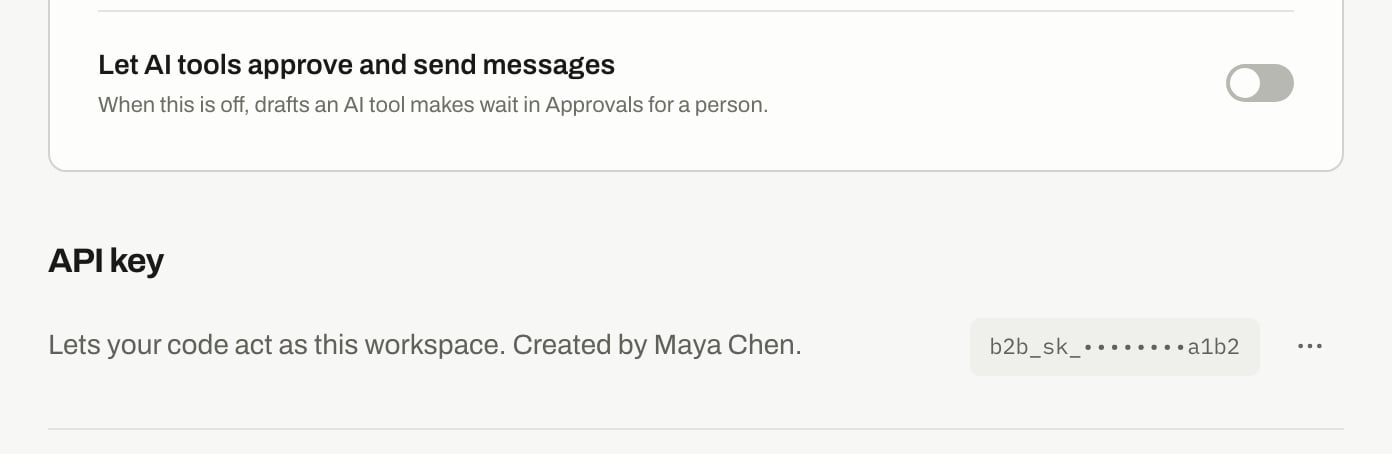
There are no scopes. A key has owner-level access to its one workspace. It can’t reach any other workspace.Some actions always need a signed-in person, and some need Let AI tools approve and send messages turned on. See Permissions.
Treat your key like a password. Don’t put it in a shared document, a public repository or code that runs in a browser. Anyone who has it can act as your workspace.
Press ⋯, then Turn off…. Anything that uses it stops working right away. You can make a new key any time.Turning a key off doesn’t stop your webhooks. They have their own signing secrets. To stop one, see Webhooks.
{"docsConfig":{"theme":"mint","$schema":"https://mintlify.com/docs.json","name":"B2B Signals","description":"Find the people worth contacting right now, and reach them on LinkedIn and email.","colors":{"primary":"#191918","light":"#FDFDFC","dark":"#191918"},"logo":{"light":"https://mintcdn.com/b2-b-signals-llc/u5yYe4FZtFc5vtD_/logo/light.svg?fit=max\u0026auto=format\u0026n=u5yYe4FZtFc5vtD_\u0026q=85\u0026s=c8e807c41e5d009f2602d011f5ea437b","dark":"https://mintcdn.com/b2-b-signals-llc/u5yYe4FZtFc5vtD_/logo/dark.svg?fit=max\u0026auto=format\u0026n=u5yYe4FZtFc5vtD_\u0026q=85\u0026s=154162a91a97ee097fd9d1a3980c621f"},"favicon":"https://mintcdn.com/b2-b-signals-llc/u5yYe4FZtFc5vtD_/favicon.svg?fit=max\u0026auto=format\u0026n=u5yYe4FZtFc5vtD_\u0026q=85\u0026s=b62813d47d7e54d14cc0971ca5f7aeed","navbar":{"primary":{"type":"button","label":"Open B2B Signals","href":"https://app.b2bsignals.ai"}},"styling":{"latex":false},"navigation":{"pages":[]}},"deployment":{"deploymentMetadataValue":{"subdomain":"b2-b-signals-llc","hasAudioNarration":false,"actualSubdomain":"b2-b-signals-llc","customDomains":[],"gitSource":{"type":"github","owner":"vladdehtiarov","repo":"b2b-signals-docs","deployBranch":"main","contentDirectory":"","isPrivate":true,"mountPath":"","label":"","_id":"6ae943733464b837db7d9aad"},"chroma":{"latestBuiltDeploymentHistoryId":"6ae9439d3464b837db7d9d59","collectionId":"20047b6a-9c42-4cdc-8880-9c2000e651d0","liveDeploymentHistoryId":"6ae9439d3464b837db7d9d59","schemaVersion":"v3"},"entitlements":{"AI_CHAT":{"status":"ENABLED"},"WEB_MCP":{"status":"ENABLED"},"NARRATION":{"status":"ENABLED"}},"buildId":"6ae9be55626a14a9d452a483","clientVersion":"0.0.4045","searchFilterCounts":[{"language":"default","tag":"Getting Started","count":2}]},"assistantConfig":{"enableAskAiButton":false,"enableStarterQuestions":false,"enableContextualStarterQuestions":false,"enableAskAiSearchBar":true},"basePath":"","hasChatPermissions":true,"hasWebMcpPermissions":true,"toggles":[{"name":"kill-isr","enabled":true,"variant":{"name":"disabled","enabled":false,"feature_enabled":true},"impressionData":false},{"name":"agent-mintlify-slack","enabled":true,"variant":{"name":"disabled","enabled":false,"feature_enabled":true},"impressionData":false},{"name":"agent-integrations-settings","enabled":true,"variant":{"name":"disabled","enabled":false,"feature_enabled":true},"impressionData":false},{"name":"automations-pr-grouping","enabled":true,"variant":{"name":"disabled","enabled":false,"feature_enabled":true},"impressionData":false},{"name":"custom-prefix","enabled":true,"variant":{"name":"disabled","enabled":false,"feature_enabled":true},"impressionData":false},{"name":"analytics-v7","enabled":true,"variant":{"name":"disabled","enabled":false,"feature_enabled":true},"impressionData":false},{"name":"user-flows-analytics","enabled":true,"variant":{"name":"disabled","enabled":false,"feature_enabled":true},"impressionData":false},{"name":"no-publish-flow","enabled":true,"variant":{"name":"disabled","enabled":false,"feature_enabled":true},"impressionData":false},{"name":"workos-onboarding","enabled":true,"variant":{"name":"disabled","enabled":false,"feature_enabled":true},"impressionData":false},{"name":"llms-txt-v2","enabled":true,"variant":{"name":"disabled","enabled":false,"feature_enabled":true},"impressionData":false},{"name":"snapshot-serving-live","enabled":true,"variant":{"name":"disabled","enabled":false,"feature_enabled":true},"impressionData":false},{"name":"stripTemperatureMiddleware","enabled":true,"variant":{"name":"disabled","enabled":false,"feature_enabled":true},"impressionData":false},{"name":"support-platform-pylon-zendesk","enabled":true,"variant":{"name":"disabled","enabled":false,"feature_enabled":true},"impressionData":false},{"name":"snapshot-serving","enabled":true,"variant":{"name":"disabled","enabled":false,"feature_enabled":true},"impressionData":false},{"name":"instant-rollback","enabled":true,"variant":{"name":"disabled","enabled":false,"feature_enabled":true},"impressionData":false},{"name":"granular-notifications-server","enabled":true,"variant":{"name":"disabled","enabled":false,"feature_enabled":true},"impressionData":false},{"name":"granular-notifications","enabled":true,"variant":{"name":"disabled","enabled":false,"feature_enabled":true},"impressionData":false},{"name":"automations-fable","enabled":true,"variant":{"name":"disabled","enabled":false,"feature_enabled":true},"impressionData":false},{"name":"fixed-ai-action-pricing","enabled":true,"variant":{"name":"disabled","enabled":false,"feature_enabled":true},"impressionData":false},{"name":"automation-resolve-merge-conflict","enabled":true,"variant":{"name":"disabled","enabled":false,"feature_enabled":true},"impressionData":false},{"name":"scoped-publishing","enabled":true,"variant":{"name":"disabled","enabled":false,"feature_enabled":true},"impressionData":false},{"name":"mintql","enabled":true,"variant":{"name":"disabled","enabled":false,"feature_enabled":true},"impressionData":false},{"name":"page-level-analytics","enabled":true,"variant":{"name":"disabled","enabled":false,"feature_enabled":true},"impressionData":false},{"name":"editor-version-history-v2","enabled":true,"variant":{"name":"disabled","enabled":false,"feature_enabled":true},"impressionData":false},{"name":"billing-page-v2","enabled":true,"variant":{"name":"disabled","enabled":false,"feature_enabled":true},"impressionData":false},{"name":"full-page-search","enabled":true,"variant":{"name":"disabled","enabled":false,"feature_enabled":true},"impressionData":false},{"name":"workspace-projects","enabled":true,"variant":{"name":"disabled","enabled":false,"feature_enabled":true},"impressionData":false},{"name":"assistant-v5","enabled":true,"variant":{"name":"disabled","enabled":false,"feature_enabled":true},"impressionData":false},{"name":"byok-sep-25","enabled":true,"variant":{"name":"disabled","enabled":false,"feature_enabled":true},"impressionData":false},{"name":"fork-pr-previews","enabled":true,"variant":{"name":"disabled","enabled":false,"feature_enabled":true},"impressionData":false},{"name":"revalidation-jwt","enabled":true,"variant":{"name":"disabled","enabled":false,"feature_enabled":true},"impressionData":false},{"name":"vite-origin","enabled":true,"variant":{"name":"disabled","enabled":false,"feature_enabled":true},"impressionData":false},{"name":"billing-updated-9-15","enabled":true,"variant":{"name":"disabled","enabled":false,"feature_enabled":true},"impressionData":false},{"name":"workos-sso-scim","enabled":true,"variant":{"name":"disabled","enabled":false,"feature_enabled":true},"impressionData":false},{"name":"hobby-abuse-scan","enabled":true,"variant":{"name":"disabled","enabled":false,"feature_enabled":true},"impressionData":false},{"name":"dashboard-inbox","enabled":true,"variant":{"name":"disabled","enabled":false,"feature_enabled":true},"impressionData":false},{"name":"workos-signup","enabled":true,"variant":{"name":"disabled","enabled":false,"feature_enabled":true},"impressionData":false},{"name":"turbopuffer-dual-write","enabled":true,"variant":{"name":"disabled","enabled":false,"feature_enabled":true},"impressionData":false},{"name":"workos-enabled","enabled":true,"variant":{"name":"disabled","enabled":false,"feature_enabled":true},"impressionData":false},{"name":"approve-review-flow","enabled":true,"variant":{"name":"disabled","enabled":false,"feature_enabled":true},"impressionData":false},{"name":"sso-setup-deadline-banner","enabled":true,"variant":{"name":"disabled","enabled":false,"feature_enabled":true},"impressionData":false}],"googleFontsInlined":false},"customCss":[],"page":{"pagePath":"developers/api-keys","slug":"/developers/api-keys","pageMetadata":{"title":"API keys","description":"Make, replace or turn off your workspace API key, and see who can manage it and what it can do.","href":"/developers/api-keys"},"description":{"compiledSource":"\"use strict\";\nconst {jsx: _jsx} = arguments[0];\nconst {useMDXComponents: _provideComponents} = arguments[0];\nfunction _createMdxContent(props) {\n const _components = {\n p: \"p\",\n ..._provideComponents(),\n ...props.components\n };\n return _jsx(_components.p, {\n children: \"Make, replace or turn off your workspace API key, and see who can manage it and what it can do.\"\n });\n}\nfunction MDXContent(props = {}) {\n const {wrapper: MDXLayout} = {\n ..._provideComponents(),\n ...props.components\n };\n return MDXLayout ? _jsx(MDXLayout, {\n ...props,\n children: _jsx(_createMdxContent, {\n ...props\n })\n }) : _createMdxContent(props);\n}\nreturn {\n default: MDXContent\n};\n","frontmatter":{},"scope":{}},"pageType":"default","mdx":{"mdxSource":{"compiledSource":"\"use strict\";const{Fragment:_Fragment,jsx:_jsx,jsxs:_jsxs}=arguments[0];const{useMDXComponents:_provideComponents}=arguments[0];function _createMdxContent(props){const _components={a:`a`,code:`code`,li:`li`,p:`p`,pre:`pre`,span:`span`,strong:`strong`,ul:`ul`,..._provideComponents(),...props.components},{Accordion,AccordionGroup,Card,CardGroup,CodeBlock,Frame,Heading,OptimizedImage,Step,Steps,Warning}=_components;if(!Accordion)_missingMdxReference(`Accordion`,true);if(!AccordionGroup)_missingMdxReference(`AccordionGroup`,true);if(!Card)_missingMdxReference(`Card`,true);if(!CardGroup)_missingMdxReference(`CardGroup`,true);if(!CodeBlock)_missingMdxReference(`CodeBlock`,true);if(!Frame)_missingMdxReference(`Frame`,true);if(!Heading)_missingMdxReference(`Heading`,true);if(!OptimizedImage)_missingMdxReference(`OptimizedImage`,true);if(!Step)_missingMdxReference(`Step`,true);if(!Steps)_missingMdxReference(`Steps`,true);if(!Warning)_missingMdxReference(`Warning`,true);return _jsxs(_Fragment,{children:[_jsxs(_components.p,{children:[`An API key lets your code act as this workspace. Manage it in `,_jsx(_components.strong,{children:`Settings`}),` › `,_jsx(_components.strong,{children:`API \u0026 MCP`}),`, under `,_jsx(_components.strong,{children:`API key`}),`.`]}),`\n`,_jsx(Heading,{level:`2`,id:`before-you-start`,children:`Before you start`}),`\n`,_jsxs(_components.ul,{children:[`\n`,_jsxs(_components.li,{children:[_jsx(_components.strong,{children:`Your role.`}),` Only owners and admins can make, replace or turn off a key. Other members can see its status.`]}),`\n`,_jsxs(_components.li,{children:[_jsx(_components.strong,{children:`Your plan.`}),` “API keys come with a paid plan (Software or Custom).” On Free, the card shows `,_jsx(_components.strong,{children:`See plans`}),` and you can’t make a key. See `,_jsx(_components.a,{href:`/getting-started/plans`,children:`Plans`}),`.`]}),`\n`,_jsxs(_components.li,{children:[_jsx(_components.strong,{children:`One key per workspace.`}),` Making a new one replaces the old one.`]}),`\n`]}),`\n`,_jsx(Heading,{level:`2`,id:`make-a-key`,children:`Make a key`}),`\n`,_jsxs(Steps,{children:[_jsx(Step,{title:`Open the API key card`,children:_jsxs(_components.p,{children:[`Go to `,_jsx(_components.strong,{children:`Settings`}),` › `,_jsx(_components.strong,{children:`API \u0026 MCP`}),`. It says “No key yet.”`]})}),_jsx(Step,{title:`Press Make a key`,children:_jsxs(_components.p,{children:[`Your full key appears. It starts with `,_jsx(_components.code,{children:`b2b_sk_`}),`.`]})}),_jsxs(Step,{title:`Press Copy and store it somewhere safe`,children:[_jsx(_components.p,{children:`We show it once and don’t keep a readable copy. Afterwards, the card shows only a masked version with the last 4 characters.`}),_jsx(Frame,{caption:`After you make a key, the card shows who made it and only the last 4 characters.`,children:_jsx(OptimizedImage,{src:`https://mintcdn.com/b2-b-signals-llc/u5yYe4FZtFc5vtD_/images/developers/api-key-and-ai-approval.png?fit=max\u0026auto=format\u0026n=u5yYe4FZtFc5vtD_\u0026q=85\u0026s=c487e16a2426d5c16053b0585848c187`,alt:`API key row with a masked key and its menu`,\"data-og-width\":`1392`,width:`1392`,\"data-og-height\":`454`,height:`454`,\"data-path\":`images/developers/api-key-and-ai-approval.png`,\"data-optimize\":`true`,\"data-opv\":`3`,srcset:`https://mintcdn.com/b2-b-signals-llc/u5yYe4FZtFc5vtD_/images/developers/api-key-and-ai-approval.png?w=280\u0026fit=max\u0026auto=format\u0026n=u5yYe4FZtFc5vtD_\u0026q=85\u0026s=10cfcd086adfe548dcc924574f4fa814 280w, https://mintcdn.com/b2-b-signals-llc/u5yYe4FZtFc5vtD_/images/developers/api-key-and-ai-approval.png?w=560\u0026fit=max\u0026auto=format\u0026n=u5yYe4FZtFc5vtD_\u0026q=85\u0026s=c1ff5c9d37c492f81dbc2b13e3a74a12 560w, https://mintcdn.com/b2-b-signals-llc/u5yYe4FZtFc5vtD_/images/developers/api-key-and-ai-approval.png?w=840\u0026fit=max\u0026auto=format\u0026n=u5yYe4FZtFc5vtD_\u0026q=85\u0026s=84019e5b0df3a23cdb81701c2bf66e55 840w, https://mintcdn.com/b2-b-signals-llc/u5yYe4FZtFc5vtD_/images/developers/api-key-and-ai-approval.png?w=1100\u0026fit=max\u0026auto=format\u0026n=u5yYe4FZtFc5vtD_\u0026q=85\u0026s=43508a31a49a915e71754907b6097b14 1100w, https://mintcdn.com/b2-b-signals-llc/u5yYe4FZtFc5vtD_/images/developers/api-key-and-ai-approval.png?w=1650\u0026fit=max\u0026auto=format\u0026n=u5yYe4FZtFc5vtD_\u0026q=85\u0026s=e9b0b45ad557cfcb70e3947c8552d414 1650w, https://mintcdn.com/b2-b-signals-llc/u5yYe4FZtFc5vtD_/images/developers/api-key-and-ai-approval.png?w=2500\u0026fit=max\u0026auto=format\u0026n=u5yYe4FZtFc5vtD_\u0026q=85\u0026s=d1c391a298576576453588bc4796f212 2500w`})})]})]}),`\n`,_jsx(_components.p,{children:`Making a key costs nothing and sends nothing.`}),`\n`,_jsx(Heading,{level:`2`,id:`use-a-key`,children:`Use a key`}),`\n`,_jsxs(_components.p,{children:[`Send it in the `,_jsx(_components.code,{children:`X-API-Key`}),` header:`]}),`\n`,_jsx(CodeBlock,{filename:``,numberOfLines:`2`,language:`shellscript`,children:_jsx(_components.pre,{className:`shiki shiki-themes github-light-default dark-plus`,style:{backgroundColor:`#ffffff`,\"--shiki-dark-bg\":`#0B0C0E`,color:`#1f2328`,\"--shiki-dark\":`#D4D4D4`},language:`shellscript`,children:_jsxs(_components.code,{language:`shellscript`,numberOfLines:`2`,children:[_jsxs(_components.span,{className:`line`,children:[_jsx(_components.span,{style:{color:`#953800`,\"--shiki-dark\":`#DCDCAA`},children:`curl`}),_jsx(_components.span,{style:{color:`#0550AE`,\"--shiki-dark\":`#569CD6`},children:` -H`}),_jsx(_components.span,{style:{color:`#0A3069`,\"--shiki-dark\":`#CE9178`},children:` \"X-API-Key: `}),_jsx(_components.span,{style:{color:`#1F2328`,\"--shiki-dark\":`#9CDCFE`},children:`$B2B_API_KEY`}),_jsx(_components.span,{style:{color:`#0A3069`,\"--shiki-dark\":`#CE9178`},children:`\"`}),_jsx(_components.span,{style:{color:`#CF222E`,\"--shiki-dark\":`#D7BA7D`},children:` \\\\`})]}),`\n`,_jsxs(_components.span,{className:`line`,children:[_jsx(_components.span,{style:{color:`#0A3069`,\"--shiki-dark\":`#CE9178`},children:` \"`}),_jsx(_components.span,{style:{color:`#1F2328`,\"--shiki-dark\":`#9CDCFE`},children:`$B2B_API_BASE`}),_jsx(_components.span,{style:{color:`#0A3069`,\"--shiki-dark\":`#CE9178`},children:`/leads/?limit=10\"`})]}),`\n`]})})}),`\n`,_jsxs(_components.p,{children:[`Your base URL is in `,_jsx(_components.a,{href:`/developers/overview#base-url`,children:`Developers overview`}),`.`]}),`\n`,_jsx(Heading,{level:`2`,id:`what-a-key-can-do`,children:`What a key can do`}),`\n`,_jsx(_components.p,{children:`There are no scopes. A key has owner-level access to its one workspace. It can’t reach any other workspace.`}),`\n`,_jsxs(_components.p,{children:[`Some actions always need a signed-in person, and some need `,_jsx(_components.strong,{children:`Let AI tools approve and send messages`}),` turned on. See `,_jsx(_components.a,{href:`/developers/overview#permissions`,children:`Permissions`}),`.`]}),`\n`,_jsx(Warning,{children:_jsx(_components.p,{children:`Treat your key like a password. Don’t put it in a shared document, a public repository or code that runs in a browser. Anyone who has it can act as your workspace.`})}),`\n`,_jsx(Heading,{level:`2`,id:`replace-a-key`,children:`Replace a key`}),`\n`,_jsx(_components.p,{children:`Do this if a key may have leaked, or when someone who had it leaves.`}),`\n`,_jsxs(Steps,{children:[_jsx(Step,{title:`Open the menu on the API key card`,children:_jsxs(_components.p,{children:[`Press `,_jsx(_components.strong,{children:`⋯`}),`, then `,_jsx(_components.strong,{children:`Make a new key…`}),`.`]})}),_jsx(Step,{title:`Confirm`,children:_jsx(_components.p,{children:`The current key stops working right away. Anything that uses it, like a Zapier step or your code, needs the new one.`})}),_jsx(Step,{title:`Copy the new key and update your tools`,children:_jsxs(_components.p,{children:[`This includes any `,_jsx(_components.a,{href:`/developers/mcp`,children:`MCP link`}),`, because the link carries the key.`]})})]}),`\n`,_jsx(_components.p,{children:`You can’t undo this. The old key can’t be brought back.`}),`\n`,_jsx(Heading,{level:`2`,id:`turn-a-key-off`,children:`Turn a key off`}),`\n`,_jsxs(_components.p,{children:[`Press `,_jsx(_components.strong,{children:`⋯`}),`, then `,_jsx(_components.strong,{children:`Turn off…`}),`. Anything that uses it stops working right away. You can make a new key any time.`]}),`\n`,_jsxs(_components.p,{children:[`Turning a key off doesn’t stop your webhooks. They have their own signing secrets. To stop one, see `,_jsx(_components.a,{href:`/developers/webhooks#turn-a-webhook-off`,children:`Webhooks`}),`.`]}),`\n`,_jsx(Heading,{level:`2`,id:`troubleshooting`,children:`Troubleshooting`}),`\n`,_jsxs(AccordionGroup,{children:[_jsx(Accordion,{title:`I lost my key`,id:`i-lost-my-key`,children:_jsx(_components.p,{children:`We can’t show it again. Make a new key, then update everything that used the old one.`})}),_jsx(Accordion,{title:`I get 401 Invalid API key`,id:`i-get-401-invalid-api-key`,children:_jsxs(_components.p,{children:[`The key is wrong or was replaced. Check that the whole key is in the `,_jsx(_components.code,{children:`X-API-Key`}),` header and that nobody made a new one.`]})}),_jsx(Accordion,{title:`I can't make a key`,id:`i-cant-make-a-key`,children:_jsxs(_components.p,{children:[`If you’re a member, ask an owner or admin. If you’re an owner or admin, your workspace may be on Free, which has no API keys. See `,_jsx(_components.a,{href:`/getting-started/plans`,children:`Plans`}),`.`]})}),_jsx(Accordion,{title:`I get 403 on one action, but other calls work`,id:`i-get-403-on-one-action-but-other-calls-work`,children:_jsxs(_components.p,{children:[`A person must do that action while signed in. The `,_jsx(_components.code,{children:`detail`}),` field says so. See `,_jsx(_components.a,{href:`/developers/overview#permissions`,children:`Permissions`}),`.`]})})]}),`\n`,_jsx(Heading,{level:`2`,id:`related`,children:`Related`}),`\n`,_jsxs(CardGroup,{cols:2,children:[_jsx(Card,{title:`Developers overview`,href:`/developers/overview`,children:`Base URL, permissions and limits.`}),_jsx(Card,{title:`MCP`,href:`/developers/mcp`,children:`Use your key with an AI tool.`})]})]})}function MDXContent(props={}){const{wrapper:MDXLayout}={..._provideComponents(),...props.components};return MDXLayout?_jsx(MDXLayout,{...props,children:_jsx(_createMdxContent,{...props})}):_createMdxContent(props)}return{default:MDXContent};function _missingMdxReference(id,component){throw new Error(`Expected `+(component?`component`:`object`)+\" `\"+id+\"` to be defined: you likely forgot to import, pass, or provide it.\")}","frontmatter":{},"scope":{"config":{},"pageMetadata":{"title":"API keys","description":"Make, replace or turn off your workspace API key, and see who can manage it and what it can do.","href":"/developers/api-keys"}}},"mdxSourceWithNoJs":null},"mdxExtracts":{"tableOfContents":[{"title":"Before you start","slug":"before-you-start","depth":2,"children":[]},{"title":"Make a key","slug":"make-a-key","depth":2,"children":[]},{"title":"Use a key","slug":"use-a-key","depth":2,"children":[]},{"title":"What a key can do","slug":"what-a-key-can-do","depth":2,"children":[]},{"title":"Replace a key","slug":"replace-a-key","depth":2,"children":[]},{"title":"Turn a key off","slug":"turn-a-key-off","depth":2,"children":[]},{"title":"Troubleshooting","slug":"troubleshooting","depth":2,"children":[]},{"title":"Related","slug":"related","depth":2,"children":[]}],"codeExamples":{}},"jsLinks":[],"subdomain":"b2-b-signals-llc","siteName":"B2B Signals","title":"API keys - B2B Signals","navMaps":{"firstHrefInVersion":{},"firstHrefInLanguage":{}},"lastModified":"2026-11-03T10:58:39.934Z","originalFileLocation":"developers/api-keys.mdx"},"headHtml":"\u003cscript data-mint-head>(function(){var d=document.documentElement,p=null;if(!p){try{p=localStorage.getItem(\"isDarkMode\")}catch(e){}if(p==='true')p='dark';else if(p==='false')p='light';if(p!=='light'\u0026\u0026p!=='dark'\u0026\u0026p!=='system')p=\"system\"}var r=p==='system'?(matchMedia(\"(prefers-color-scheme: dark)\").matches?'dark':'light'):p;d.classList.remove(r==='dark'?'light':'dark');d.classList.add(r);d.setAttribute(\"data-theme-preference\",p)})();\u003c/script>\u003cmeta data-mint-head name=\"description\" content=\"Make, replace or turn off your workspace API key, and see who can manage it and what it can do.\">\u003cmeta data-mint-head name=\"application-name\" content=\"B2B Signals\">\u003cmeta data-mint-head name=\"generator\" content=\"Mintlify\">\u003clink data-mint-head rel=\"icon\" type=\"image/png\" sizes=\"192x192\" href=\"/mintlify-assets/_mintlify/favicons/b2-b-signals-llc/V2yPkCmV8meRxeDy/_generated/favicon/android-chrome-192x192.png\" media=\"(prefers-color-scheme: light)\">\u003clink data-mint-head rel=\"apple-touch-icon\" type=\"image/png\" sizes=\"180x180\" href=\"/mintlify-assets/_mintlify/favicons/b2-b-signals-llc/V2yPkCmV8meRxeDy/_generated/favicon/apple-touch-icon.png\">\u003clink data-mint-head rel=\"icon\" type=\"image/png\" sizes=\"16x16\" href=\"/mintlify-assets/_mintlify/favicons/b2-b-signals-llc/V2yPkCmV8meRxeDy/_generated/favicon/favicon-16x16.png\" media=\"(prefers-color-scheme: light)\">\u003clink data-mint-head rel=\"icon\" type=\"image/png\" sizes=\"32x32\" href=\"/mintlify-assets/_mintlify/favicons/b2-b-signals-llc/V2yPkCmV8meRxeDy/_generated/favicon/favicon-32x32.png\" media=\"(prefers-color-scheme: light)\">\u003clink data-mint-head rel=\"shortcut icon\" type=\"image/x-icon\" href=\"/mintlify-assets/_mintlify/favicons/b2-b-signals-llc/V2yPkCmV8meRxeDy/_generated/favicon/favicon.ico\" media=\"(prefers-color-scheme: light)\">\u003clink data-mint-head rel=\"icon\" type=\"image/png\" sizes=\"192x192\" href=\"/mintlify-assets/_mintlify/favicons/b2-b-signals-llc/V2yPkCmV8meRxeDy/_generated/favicon-dark/android-chrome-192x192.png\" media=\"(prefers-color-scheme: dark)\">\u003clink data-mint-head rel=\"icon\" type=\"image/png\" sizes=\"16x16\" href=\"/mintlify-assets/_mintlify/favicons/b2-b-signals-llc/V2yPkCmV8meRxeDy/_generated/favicon-dark/favicon-16x16.png\" media=\"(prefers-color-scheme: dark)\">\u003clink data-mint-head rel=\"icon\" type=\"image/png\" sizes=\"32x32\" href=\"/mintlify-assets/_mintlify/favicons/b2-b-signals-llc/V2yPkCmV8meRxeDy/_generated/favicon-dark/favicon-32x32.png\" media=\"(prefers-color-scheme: dark)\">\u003clink data-mint-head rel=\"shortcut icon\" type=\"image/x-icon\" href=\"/mintlify-assets/_mintlify/favicons/b2-b-signals-llc/V2yPkCmV8meRxeDy/_generated/favicon-dark/favicon.ico\" media=\"(prefers-color-scheme: dark)\">\u003cmeta data-mint-head property=\"og:title\" content=\"API keys - B2B Signals\">\u003cmeta data-mint-head property=\"og:description\" content=\"Make, replace or turn off your workspace API key, and see who can manage it and what it can do.\">\u003cmeta data-mint-head property=\"og:site_name\" content=\"B2B Signals\">\u003cmeta data-mint-head property=\"og:url\" content=\"https://b2-b-signals-llc.mintlify.app/developers/api-keys\">\u003cmeta data-mint-head property=\"og:type\" content=\"website\">\u003cmeta data-mint-head property=\"og:image\" content=\"https://b2-b-signals-llc.mintlify.app/_mintlify/api/og/v2?division=Build+on+B2B+Signals\u0026amp;title=API+keys\u0026amp;description=Make%2C+replace+or+turn+off+your+workspace+API+key%2C+and+see+who+can+manage+it+and+what+it+can+do.\u0026amp;theme=bc9c729a5d99af55caabad74\u0026amp;signature=45c5437af1f8f4bb27b098fd30765e804ee9a44d7b5159e57e861ade5c57e829\">\u003cmeta data-mint-head property=\"og:image:width\" content=\"1200\">\u003cmeta data-mint-head property=\"og:image:height\" content=\"630\">\u003cmeta data-mint-head name=\"twitter:card\" content=\"summary_large_image\">\u003cmeta data-mint-head name=\"twitter:title\" content=\"API keys - B2B Signals\">\u003cmeta data-mint-head name=\"twitter:description\" content=\"Make, replace or turn off your workspace API key, and see who can manage it and what it can do.\">\u003cmeta data-mint-head name=\"twitter:image\" content=\"https://b2-b-signals-llc.mintlify.app/_mintlify/api/og/v2?division=Build+on+B2B+Signals\u0026amp;title=API+keys\u0026amp;description=Make%2C+replace+or+turn+off+your+workspace+API+key%2C+and+see+who+can+manage+it+and+what+it+can+do.\u0026amp;theme=bc9c729a5d99af55caabad74\u0026amp;signature=45c5437af1f8f4bb27b098fd30765e804ee9a44d7b5159e57e861ade5c57e829\">\u003cmeta data-mint-head name=\"twitter:image:width\" content=\"1200\">\u003cmeta data-mint-head name=\"twitter:image:height\" content=\"630\">\u003cmeta data-mint-head name=\"msapplication-config\" content=\"/mintlify-assets/_mintlify/favicons/b2-b-signals-llc/V2yPkCmV8meRxeDy/_generated/favicon/browserconfig.xml\">\u003cmeta data-mint-head name=\"apple-mobile-web-app-title\" content=\"B2B Signals\">\u003cmeta data-mint-head name=\"msapplication-TileColor\" content=\"#191918\">\u003clink data-mint-head rel=\"canonical\" href=\"https://b2-b-signals-llc.mintlify.app/developers/api-keys\">\u003clink data-mint-head rel=\"alternate\" type=\"application/xml\" href=\"/sitemap.xml\">\u003clink data-mint-head rel=\"alternate\" type=\"text/markdown\" href=\"/developers/api-keys.md\">\u003cscript data-mint-head type=\"application/ld+json\">{\"@context\":\"https://schema.org\",\"@graph\":[{\"@type\":\"Organization\",\"@id\":\"https://b2-b-signals-llc.mintlify.app/#organization\",\"name\":\"B2B Signals\",\"url\":\"https://b2-b-signals-llc.mintlify.app\",\"logo\":{\"@type\":\"ImageObject\",\"url\":\"https://mintcdn.com/b2-b-signals-llc/u5yYe4FZtFc5vtD_/logo/light.svg?fit=max\u0026auto=format\u0026n=u5yYe4FZtFc5vtD_\u0026q=85\u0026s=c8e807c41e5d009f2602d011f5ea437b\"}},{\"@type\":\"WebSite\",\"@id\":\"https://b2-b-signals-llc.mintlify.app#website\",\"name\":\"B2B Signals\",\"url\":\"https://b2-b-signals-llc.mintlify.app\",\"publisher\":{\"@id\":\"https://b2-b-signals-llc.mintlify.app/#organization\"}},{\"@type\":\"WebPage\",\"@id\":\"https://b2-b-signals-llc.mintlify.app/developers/api-keys#webpage\",\"url\":\"https://b2-b-signals-llc.mintlify.app/developers/api-keys\",\"name\":\"API keys\",\"description\":\"Make, replace or turn off your workspace API key, and see who can manage it and what it can do.\",\"dateModified\":\"2026-11-03T10:58:39.934Z\",\"isPartOf\":{\"@id\":\"https://b2-b-signals-llc.mintlify.app#website\"},\"breadcrumb\":{\"@id\":\"https://b2-b-signals-llc.mintlify.app/developers/api-keys#breadcrumb\"}},{\"@type\":\"BreadcrumbList\",\"@id\":\"https://b2-b-signals-llc.mintlify.app/developers/api-keys#breadcrumb\",\"itemListElement\":[{\"@type\":\"ListItem\",\"position\":1,\"name\":\"Build on B2B Signals\",\"item\":\"https://b2-b-signals-llc.mintlify.app/developers/overview\"},{\"@type\":\"ListItem\",\"position\":2,\"name\":\"API keys\",\"item\":\"https://b2-b-signals-llc.mintlify.app/developers/api-keys\"}]},{\"@type\":[\"Article\",\"TechArticle\"],\"@id\":\"https://b2-b-signals-llc.mintlify.app/developers/api-keys#article\",\"headline\":\"API keys\",\"name\":\"API keys\",\"description\":\"Make, replace or turn off your workspace API key, and see who can manage it and what it can do.\",\"url\":\"https://b2-b-signals-llc.mintlify.app/developers/api-keys\",\"mainEntityOfPage\":{\"@id\":\"https://b2-b-signals-llc.mintlify.app/developers/api-keys#webpage\"},\"dateModified\":\"2026-11-03T10:58:39.934Z\",\"publisher\":{\"@id\":\"https://b2-b-signals-llc.mintlify.app/#organization\"},\"isPartOf\":{\"@id\":\"https://b2-b-signals-llc.mintlify.app#website\"}}]}\u003c/script>\u003cscript data-mint-head type=\"application/ld+json\">{\"@context\":\"https://schema.org\",\"@type\":\"WebSite\",\"name\":\"B2B Signals\",\"creator\":{\"@type\":\"Organization\",\"name\":\"Mintlify\",\"url\":\"https://mintlify.com\"}}\u003c/script>","siteName":"B2B Signals","nav":{"global":null,"tabs":[{"tab":"Guides","pages":[{"title":"Guides","href":""}]},{"tab":"Developers","groups":[{"group":"Build on B2B Signals","pages":[{"title":"Developers overview","sidebarTitle":"Overview","href":"/developers/overview"},{"title":"API quickstart","sidebarTitle":"Quickstart","description":"Your first calls to the B2B Signals API with curl: add a person, list people, add people to a campaign and read the results.","href":"/developers/quickstart"},{"title":"API keys","href":"/developers/api-keys"},{"title":"Webhooks","description":"Send B2B Signals events to Zapier, Make, n8n or your own code, with the event list, payload fields, secret check and retry rules.","href":"/developers/webhooks"},{"title":"MCP","href":"/developers/mcp"}]},{"group":"API reference","pages":[{"group":"Add people","pages":[{"title":"Add one person","deprecated":null,"version":null,"openapi":"/api/openapi.json post /intake/people","href":"/api-reference/add-people/add-one-person"},{"title":"Add up to 100 people","deprecated":null,"version":null,"openapi":"/api/openapi.json post /intake/people/bulk","href":"/api-reference/add-people/add-up-to-100-people"},{"title":"Check the key and the last test row","deprecated":null,"version":null,"openapi":"/api/openapi.json get /intake/status","href":"/api-reference/add-people/check-the-key-and-the-last-test-row"}]},{"group":"People","pages":[{"title":"List people","deprecated":null,"version":null,"openapi":"/api/openapi.json get /leads/","href":"/api-reference/people/list-people"},{"title":"Get a person","deprecated":null,"version":null,"openapi":"/api/openapi.json get /leads/details/{lead_id}","href":"/api-reference/people/get-a-person"},{"title":"Find a person by LinkedIn URL","deprecated":null,"version":null,"openapi":"/api/openapi.json get /leads/by-linkedin","href":"/api-reference/people/find-a-person-by-linkedin-url"},{"title":"Export people as CSV","deprecated":null,"version":null,"openapi":"/api/openapi.json get /leads/export","href":"/api-reference/people/export-people-as-csv"},{"title":"Update a person","deprecated":null,"version":null,"openapi":"/api/openapi.json patch /leads/{lead_id}","href":"/api-reference/people/update-a-person"},{"title":"Fix a person's name","deprecated":null,"version":null,"openapi":"/api/openapi.json patch /leads/{lead_id}/name","href":"/api-reference/people/fix-a-persons-name"},{"title":"Mark good fit or not a fit","deprecated":null,"version":null,"openapi":"/api/openapi.json post /people/verdict","href":"/api-reference/people/mark-good-fit-or-not-a-fit"},{"title":"Update many people","deprecated":null,"version":null,"openapi":"/api/openapi.json post /people/bulk","href":"/api-reference/people/update-many-people"},{"title":"Get why now and current campaigns","deprecated":null,"version":null,"openapi":"/api/openapi.json get /people/{lead_id}/context","href":"/api-reference/people/get-why-now-and-current-campaigns"},{"title":"Write a suggested message","deprecated":null,"version":null,"openapi":"/api/openapi.json post /leads/{lead_id}/outreach","href":"/api-reference/people/write-a-suggested-message"},{"title":"Get the suggested opener","deprecated":null,"version":null,"openapi":"/api/openapi.json get /people/{lead_id}/opener","href":"/api-reference/people/get-the-suggested-opener"},{"title":"Get a person's history","deprecated":null,"version":null,"openapi":"/api/openapi.json get /leads/{lead_id}/timeline","href":"/api-reference/people/get-a-persons-history"},{"title":"List a person's campaigns","deprecated":null,"version":null,"openapi":"/api/openapi.json get /leads/{lead_id}/campaigns","href":"/api-reference/people/list-a-persons-campaigns"},{"title":"List a person's lists","deprecated":null,"version":null,"openapi":"/api/openapi.json get /leads/{lead_id}/lists","href":"/api-reference/people/list-a-persons-lists"},{"title":"Get a person's tags","deprecated":null,"version":null,"openapi":"/api/openapi.json get /leads/{lead_id}/tags","href":"/api-reference/people/get-a-persons-tags"},{"title":"Replace all tags","deprecated":null,"version":null,"openapi":"/api/openapi.json put /leads/{lead_id}/tags","href":"/api-reference/people/replace-all-tags"},{"title":"Add tags","deprecated":null,"version":null,"openapi":"/api/openapi.json post /leads/{lead_id}/tags","href":"/api-reference/people/add-tags"},{"title":"List custom fields","deprecated":null,"version":null,"openapi":"/api/openapi.json get /lead-custom-fields","href":"/api-reference/people/list-custom-fields"},{"title":"Change a custom field value","deprecated":null,"version":null,"openapi":"/api/openapi.json patch /lead-custom-fields/{lead_id}","href":"/api-reference/people/change-a-custom-field-value"}]},{"group":"Notes and tasks","pages":[{"title":"List notes","deprecated":null,"version":null,"openapi":"/api/openapi.json get /leads/{lead_id}/notes","href":"/api-reference/notes-and-tasks/list-notes"},{"title":"Add a note","deprecated":null,"version":null,"openapi":"/api/openapi.json post /leads/{lead_id}/notes","href":"/api-reference/notes-and-tasks/add-a-note"},{"title":"Delete a note","deprecated":null,"version":null,"openapi":"/api/openapi.json delete /leads/{lead_id}/notes/{note_id}","href":"/api-reference/notes-and-tasks/delete-a-note"},{"title":"Edit a note","deprecated":null,"version":null,"openapi":"/api/openapi.json patch /leads/{lead_id}/notes/{note_id}","href":"/api-reference/notes-and-tasks/edit-a-note"},{"title":"List a person's tasks","deprecated":null,"version":null,"openapi":"/api/openapi.json get /leads/{lead_id}/tasks","href":"/api-reference/notes-and-tasks/list-a-persons-tasks"},{"title":"Add a task","deprecated":null,"version":null,"openapi":"/api/openapi.json post /leads/{lead_id}/tasks","href":"/api-reference/notes-and-tasks/add-a-task"},{"title":"List tasks","deprecated":null,"version":null,"openapi":"/api/openapi.json get /pipeline/tasks","href":"/api-reference/notes-and-tasks/list-tasks"},{"title":"Delete a task","deprecated":null,"version":null,"openapi":"/api/openapi.json delete /pipeline/tasks/{task_id}","href":"/api-reference/notes-and-tasks/delete-a-task"},{"title":"Update a task","deprecated":null,"version":null,"openapi":"/api/openapi.json patch /pipeline/tasks/{task_id}","href":"/api-reference/notes-and-tasks/update-a-task"}]},{"group":"Lists","pages":[{"title":"List lists","deprecated":null,"version":null,"openapi":"/api/openapi.json get /lead-lists/","href":"/api-reference/lists/list-lists"},{"title":"Create a list","deprecated":null,"version":null,"openapi":"/api/openapi.json post /lead-lists/","href":"/api-reference/lists/create-a-list"},{"title":"Get a list","deprecated":null,"version":null,"openapi":"/api/openapi.json get /lead-lists/{list_id}","href":"/api-reference/lists/get-a-list"},{"title":"Delete a list","deprecated":null,"version":null,"openapi":"/api/openapi.json delete /lead-lists/{list_id}","href":"/api-reference/lists/delete-a-list"},{"title":"Rename a list","deprecated":null,"version":null,"openapi":"/api/openapi.json patch /lead-lists/{list_id}","href":"/api-reference/lists/rename-a-list"},{"title":"List people on a list","deprecated":null,"version":null,"openapi":"/api/openapi.json get /lead-lists/{list_id}/leads","href":"/api-reference/lists/list-people-on-a-list"},{"title":"Add people to a list","deprecated":null,"version":null,"openapi":"/api/openapi.json post /lead-lists/{list_id}/members","href":"/api-reference/lists/add-people-to-a-list"},{"title":"Remove people from a list","deprecated":null,"version":null,"openapi":"/api/openapi.json delete /lead-lists/{list_id}/members","href":"/api-reference/lists/remove-people-from-a-list"},{"title":"Add one person by LinkedIn URL","deprecated":null,"version":null,"openapi":"/api/openapi.json post /lead-lists/{list_id}/members/by-url","href":"/api-reference/lists/add-one-person-by-linkedin-url"},{"title":"Add a whole list to a campaign","deprecated":null,"version":null,"openapi":"/api/openapi.json post /lead-lists/{list_id}/enroll","href":"/api-reference/lists/add-a-whole-list-to-a-campaign"}]},{"group":"Campaigns","pages":[{"title":"List campaigns","deprecated":null,"version":null,"openapi":"/api/openapi.json get /workflows/","href":"/api-reference/campaigns/list-campaigns"},{"title":"Get a campaign","deprecated":null,"version":null,"openapi":"/api/openapi.json get /workflows/{workflow_id}","href":"/api-reference/campaigns/get-a-campaign"},{"title":"Delete a campaign","deprecated":null,"version":null,"openapi":"/api/openapi.json delete /workflows/{workflow_id}","href":"/api-reference/campaigns/delete-a-campaign"},{"title":"Check if a campaign can start","deprecated":null,"version":null,"openapi":"/api/openapi.json get /workflows/{workflow_id}/readiness","href":"/api-reference/campaigns/check-if-a-campaign-can-start"},{"title":"Preview who would start","deprecated":null,"version":null,"openapi":"/api/openapi.json get /workflows/{workflow_id}/launch-preview","href":"/api-reference/campaigns/preview-who-would-start"},{"title":"Start or resume a campaign","deprecated":null,"version":null,"openapi":"/api/openapi.json post /workflows/{workflow_id}/activate","href":"/api-reference/campaigns/start-or-resume-a-campaign"},{"title":"Pause a campaign","deprecated":null,"version":null,"openapi":"/api/openapi.json post /workflows/{workflow_id}/pause","href":"/api-reference/campaigns/pause-a-campaign"},{"title":"Archive a campaign","deprecated":null,"version":null,"openapi":"/api/openapi.json post /workflows/{workflow_id}/archive","href":"/api-reference/campaigns/archive-a-campaign"},{"title":"Restore an archived campaign","deprecated":null,"version":null,"openapi":"/api/openapi.json post /workflows/{workflow_id}/unarchive","href":"/api-reference/campaigns/restore-an-archived-campaign"},{"title":"Preview adding people","deprecated":null,"version":null,"openapi":"/api/openapi.json post /workflows/{workflow_id}/enroll/preview","href":"/api-reference/campaigns/preview-adding-people"},{"title":"Add people to a campaign","deprecated":null,"version":null,"openapi":"/api/openapi.json post /workflows/{workflow_id}/enroll","href":"/api-reference/campaigns/add-people-to-a-campaign"},{"title":"Add people, with your own text","deprecated":null,"version":null,"openapi":"/api/openapi.json post /workflows/{workflow_id}/enroll-people","href":"/api-reference/campaigns/add-people-with-your-own-text"},{"title":"See what needs you","deprecated":null,"version":null,"openapi":"/api/openapi.json get /workflows/{workflow_id}/needs-you","href":"/api-reference/campaigns/see-what-needs-you"},{"title":"Get campaign results","deprecated":null,"version":null,"openapi":"/api/openapi.json get /workflows/{workflow_id}/analytics/summary","href":"/api-reference/campaigns/get-campaign-results"},{"title":"List people and their results","deprecated":null,"version":null,"openapi":"/api/openapi.json get /workflows/{workflow_id}/analytics/leads","href":"/api-reference/campaigns/list-people-and-their-results"},{"title":"Get results by sender","deprecated":null,"version":null,"openapi":"/api/openapi.json get /workflows/{workflow_id}/analytics/senders","href":"/api-reference/campaigns/get-results-by-sender"},{"title":"Get results by step","deprecated":null,"version":null,"openapi":"/api/openapi.json get /workflows/{workflow_id}/analytics/sequence","href":"/api-reference/campaigns/get-results-by-step"},{"title":"Get A/B test results","deprecated":null,"version":null,"openapi":"/api/openapi.json get /workflows/{workflow_id}/analytics/variants","href":"/api-reference/campaigns/get-ab-test-results"},{"title":"Export sent messages as CSV","deprecated":null,"version":null,"openapi":"/api/openapi.json get /workflows/{workflow_id}/export/messages.csv","href":"/api-reference/campaigns/export-sent-messages-as-csv"}]},{"group":"Campaign people","pages":[{"title":"List campaign people","deprecated":null,"version":null,"openapi":"/api/openapi.json get /workflow-runs/","href":"/api-reference/campaign-people/list-campaign-people"},{"title":"List upcoming sends","deprecated":null,"version":null,"openapi":"/api/openapi.json get /workflow-runs/scheduled","href":"/api-reference/campaign-people/list-upcoming-sends"},{"title":"Get one place in a campaign","deprecated":null,"version":null,"openapi":"/api/openapi.json get /workflow-runs/{run_id}","href":"/api-reference/campaign-people/get-one-place-in-a-campaign"},{"title":"Get what happened","deprecated":null,"version":null,"openapi":"/api/openapi.json get /workflow-runs/{run_id}/activity","href":"/api-reference/campaign-people/get-what-happened"},{"title":"Get the steps still to come","deprecated":null,"version":null,"openapi":"/api/openapi.json get /workflow-runs/{run_id}/planned-steps","href":"/api-reference/campaign-people/get-the-steps-still-to-come"},{"title":"Pause one person","deprecated":null,"version":null,"openapi":"/api/openapi.json post /workflow-runs/{run_id}/pause","href":"/api-reference/campaign-people/pause-one-person"},{"title":"Resume one person","deprecated":null,"version":null,"openapi":"/api/openapi.json post /workflow-runs/{run_id}/resume","href":"/api-reference/campaign-people/resume-one-person"},{"title":"Remove one person from a campaign","deprecated":null,"version":null,"openapi":"/api/openapi.json post /workflow-runs/{run_id}/remove-from-campaign","href":"/api-reference/campaign-people/remove-one-person-from-a-campaign"},{"title":"Remove people from a campaign","deprecated":null,"version":null,"openapi":"/api/openapi.json post /workflow-runs/remove-leads-from-campaign","href":"/api-reference/campaign-people/remove-people-from-a-campaign"}]},{"group":"Approvals","pages":[{"title":"List messages waiting for approval","deprecated":null,"version":null,"openapi":"/api/openapi.json get /workflow-runs/pending-approvals","href":"/api-reference/approvals/list-messages-waiting-for-approval"},{"title":"Approve a message","deprecated":null,"version":null,"openapi":"/api/openapi.json post /workflow-runs/{run_id}/approve","href":"/api-reference/approvals/approve-a-message"},{"title":"Approve several messages","deprecated":null,"version":null,"openapi":"/api/openapi.json post /workflow-runs/batch-approve","href":"/api-reference/approvals/approve-several-messages"},{"title":"Skip a message","deprecated":null,"version":null,"openapi":"/api/openapi.json post /workflow-runs/{run_id}/reject","href":"/api-reference/approvals/skip-a-message"},{"title":"Skip several messages","deprecated":null,"version":null,"openapi":"/api/openapi.json post /workflow-runs/batch-reject","href":"/api-reference/approvals/skip-several-messages"}]},{"group":"Inbox","pages":[{"title":"List conversations","deprecated":null,"version":null,"openapi":"/api/openapi.json get /conversations","href":"/api-reference/inbox/list-conversations"},{"title":"Count conversations","deprecated":null,"version":null,"openapi":"/api/openapi.json get /conversations/counts","href":"/api-reference/inbox/count-conversations"},{"title":"Get a conversation","deprecated":null,"version":null,"openapi":"/api/openapi.json get /conversations/{conversation_id}","href":"/api-reference/inbox/get-a-conversation"},{"title":"List messages","deprecated":null,"version":null,"openapi":"/api/openapi.json get /conversations/{conversation_id}/messages","href":"/api-reference/inbox/list-messages"},{"title":"Mark as read","deprecated":null,"version":null,"openapi":"/api/openapi.json post /conversations/{conversation_id}/mark-read","href":"/api-reference/inbox/mark-as-read"},{"title":"Mark as unread","deprecated":null,"version":null,"openapi":"/api/openapi.json post /conversations/{conversation_id}/mark-unread","href":"/api-reference/inbox/mark-as-unread"},{"title":"Archive a conversation","deprecated":null,"version":null,"openapi":"/api/openapi.json post /conversations/{conversation_id}/archive","href":"/api-reference/inbox/archive-a-conversation"},{"title":"Restore a conversation","deprecated":null,"version":null,"openapi":"/api/openapi.json post /conversations/{conversation_id}/unarchive","href":"/api-reference/inbox/restore-a-conversation"},{"title":"Set the reply tag","deprecated":null,"version":null,"openapi":"/api/openapi.json post /conversations/{conversation_id}/tag","href":"/api-reference/inbox/set-the-reply-tag"},{"title":"Replace your own tags","deprecated":null,"version":null,"openapi":"/api/openapi.json patch /conversations/{conversation_id}/tags","href":"/api-reference/inbox/replace-your-own-tags"}]},{"group":"Do not contact","pages":[{"title":"List people on Do not contact","deprecated":null,"version":null,"openapi":"/api/openapi.json get /suppressions/","href":"/api-reference/do-not-contact/list-people-on-do-not-contact"},{"title":"Add a person","deprecated":null,"version":null,"openapi":"/api/openapi.json post /suppressions/","href":"/api-reference/do-not-contact/add-a-person"},{"title":"Add up to 100 people","deprecated":null,"version":null,"openapi":"/api/openapi.json post /suppressions/bulk","href":"/api-reference/do-not-contact/add-up-to-100-people"},{"title":"Remove up to 500 people","deprecated":null,"version":null,"openapi":"/api/openapi.json post /suppressions/bulk-delete","href":"/api-reference/do-not-contact/remove-up-to-500-people"},{"title":"Remove a person","deprecated":null,"version":null,"openapi":"/api/openapi.json delete /suppressions/{suppression_id}","href":"/api-reference/do-not-contact/remove-a-person"},{"title":"List companies on Do not contact","deprecated":null,"version":null,"openapi":"/api/openapi.json get /company-blacklist/","href":"/api-reference/do-not-contact/list-companies-on-do-not-contact"},{"title":"Add up to 100 companies","deprecated":null,"version":null,"openapi":"/api/openapi.json post /company-blacklist/bulk","href":"/api-reference/do-not-contact/add-up-to-100-companies"},{"title":"Remove up to 200 companies","deprecated":null,"version":null,"openapi":"/api/openapi.json post /company-blacklist/bulk-delete","href":"/api-reference/do-not-contact/remove-up-to-200-companies"}]},{"group":"Senders","pages":[{"title":"List senders","deprecated":null,"version":null,"openapi":"/api/openapi.json get /connected-accounts/","href":"/api-reference/senders/list-senders"},{"title":"Get a sender","deprecated":null,"version":null,"openapi":"/api/openapi.json get /connected-accounts/{account_id}","href":"/api-reference/senders/get-a-sender"},{"title":"Pause a sender","deprecated":null,"version":null,"openapi":"/api/openapi.json post /connected-accounts/{account_id}/pause","href":"/api-reference/senders/pause-a-sender"},{"title":"Resume a sender","deprecated":null,"version":null,"openapi":"/api/openapi.json post /connected-accounts/{account_id}/resume","href":"/api-reference/senders/resume-a-sender"}]},{"group":"Webhooks","pages":[{"title":"List webhook events","deprecated":null,"version":null,"openapi":"/api/openapi.json get /webhooks/catalog","href":"/api-reference/webhooks/list-webhook-events"},{"title":"Test an address before saving","deprecated":null,"version":null,"openapi":"/api/openapi.json post /webhooks/test","href":"/api-reference/webhooks/test-an-address-before-saving"},{"title":"List webhooks","deprecated":null,"version":null,"openapi":"/api/openapi.json get /webhooks/","href":"/api-reference/webhooks/list-webhooks"},{"title":"Create a webhook","deprecated":null,"version":null,"openapi":"/api/openapi.json post /webhooks/","href":"/api-reference/webhooks/create-a-webhook"},{"title":"Delete a webhook","deprecated":null,"version":null,"openapi":"/api/openapi.json delete /webhooks/{webhook_id}","href":"/api-reference/webhooks/delete-a-webhook"},{"title":"Update a webhook","deprecated":null,"version":null,"openapi":"/api/openapi.json patch /webhooks/{webhook_id}","href":"/api-reference/webhooks/update-a-webhook"},{"title":"Send a test event","deprecated":null,"version":null,"openapi":"/api/openapi.json post /webhooks/{webhook_id}/test","href":"/api-reference/webhooks/send-a-test-event"},{"title":"Try a stopped webhook again","deprecated":null,"version":null,"openapi":"/api/openapi.json post /webhooks/{webhook_id}/try-again","href":"/api-reference/webhooks/try-a-stopped-webhook-again"}]},{"group":"Integrations","pages":[{"title":"List outreach tools","deprecated":null,"version":null,"openapi":"/api/openapi.json get /integrations/","href":"/api-reference/integrations/list-outreach-tools"},{"title":"Get one tool","deprecated":null,"version":null,"openapi":"/api/openapi.json get /integrations/{provider}","href":"/api-reference/integrations/get-one-tool"},{"title":"List fields sent to a tool","deprecated":null,"version":null,"openapi":"/api/openapi.json get /integrations/{provider}/fields","href":"/api-reference/integrations/list-fields-sent-to-a-tool"},{"title":"List a workspace's campaigns","deprecated":null,"version":null,"openapi":"/api/openapi.json get /integrations/{provider}/targets/{target_id}/campaigns","href":"/api-reference/integrations/list-a-workspaces-campaigns"},{"title":"List connected calendars","deprecated":null,"version":null,"openapi":"/api/openapi.json get /integrations/calendar","href":"/api-reference/integrations/list-connected-calendars"},{"title":"List HeyReach campaigns","deprecated":null,"version":null,"openapi":"/api/openapi.json get /integrations/heyreach/campaigns/overview","href":"/api-reference/integrations/list-heyreach-campaigns"},{"title":"Preview a move from HeyReach","deprecated":null,"version":null,"openapi":"/api/openapi.json post /integrations/heyreach/campaigns/{campaign_id}/move-preview","href":"/api-reference/integrations/preview-a-move-from-heyreach"},{"title":"Check a send to HeyReach","deprecated":null,"version":null,"openapi":"/api/openapi.json get /people/{lead_id}/push/heyreach","href":"/api-reference/integrations/check-a-send-to-heyreach"},{"title":"Send a person to HeyReach","deprecated":null,"version":null,"openapi":"/api/openapi.json post /people/{lead_id}/push/heyreach","href":"/api-reference/integrations/send-a-person-to-heyreach"},{"title":"List a campaign's tools","deprecated":null,"version":null,"openapi":"/api/openapi.json get /workflows/{workflow_id}/integrations","href":"/api-reference/integrations/list-a-campaigns-tools"},{"title":"Get a campaign's tool setting","deprecated":null,"version":null,"openapi":"/api/openapi.json get /workflows/{workflow_id}/integrations/{provider}","href":"/api-reference/integrations/get-a-campaigns-tool-setting"},{"title":"Set a campaign's tool","deprecated":null,"version":null,"openapi":"/api/openapi.json put /workflows/{workflow_id}/integrations/{provider}","href":"/api-reference/integrations/set-a-campaigns-tool"},{"title":"Use the workspace default","deprecated":null,"version":null,"openapi":"/api/openapi.json delete /workflows/{workflow_id}/integrations/{provider}","href":"/api-reference/integrations/use-the-workspace-default"},{"title":"Preview a send to a tool","deprecated":null,"version":null,"openapi":"/api/openapi.json get /workflows/{workflow_id}/integrations/{provider}/preview","href":"/api-reference/integrations/preview-a-send-to-a-tool"},{"title":"Send to a tool now","deprecated":null,"version":null,"openapi":"/api/openapi.json post /workflows/{workflow_id}/integrations/{provider}/push-now","href":"/api-reference/integrations/send-to-a-tool-now"}]},{"group":"Reports","pages":[{"title":"Get a report","deprecated":null,"version":null,"openapi":"/api/openapi.json get /reports","href":"/api-reference/reports/get-a-report"},{"title":"List the people behind a row","deprecated":null,"version":null,"openapi":"/api/openapi.json get /reports/people","href":"/api-reference/reports/list-the-people-behind-a-row"},{"title":"Export a report as CSV","deprecated":null,"version":null,"openapi":"/api/openapi.json get /reports/export.csv","href":"/api-reference/reports/export-a-report-as-csv"}]},{"group":"Watchlists","pages":[{"title":"List watchlists","deprecated":null,"version":null,"openapi":"/api/openapi.json get /watchlists/","href":"/api-reference/watchlists/list-watchlists"},{"title":"Get a watchlist","deprecated":null,"version":null,"openapi":"/api/openapi.json get /watchlists/{watchlist_id}","href":"/api-reference/watchlists/get-a-watchlist"},{"title":"List watched companies","deprecated":null,"version":null,"openapi":"/api/openapi.json get /watchlists/{watchlist_id}/companies","href":"/api-reference/watchlists/list-watched-companies"},{"title":"List watched people","deprecated":null,"version":null,"openapi":"/api/openapi.json get /watchlists/{watchlist_id}/people","href":"/api-reference/watchlists/list-watched-people"}]},{"group":"Search","pages":[{"title":"Search your workspace","deprecated":null,"version":null,"openapi":"/api/openapi.json get /search","href":"/api-reference/search/search-your-workspace"}]}]}]}]},"basePath":"","title":"API keys - B2B Signals","buildId":"dpl_36EDyZCDfRuoUD9af5CH4M1bqY2h","deploymentId":"dpl_36EDyZCDfRuoUD9af5CH4M1bqY2h","dynamics":["07c022d89b","a74be98ba7"],"chunks":["Frame-DW6UFrUy.js","DynamicMarkdown-B62XqCSI.js","zoom-image-lightbox-eHyQ0tlO.js","lightbox-handle-r17bVUz3.js"]}