

Add a webhook
1
Press Add webhook
Give it a Name, then put your address in Where to send. It must start with
http:// or https:// and be publicly reachable.2
Choose your events
Under When should we send?, tick the events you want. First reply starts ticked. Choose all ticks all 20.
3
Limit it, if you want
Under Only for, pick Campaigns and Sources. See Only for.
4
Press Send a test event
We send one test event, and show your tool’s answer. Nothing is saved yet.
5
Press Save webhook
Copy the signing secret now. It’s shown once.
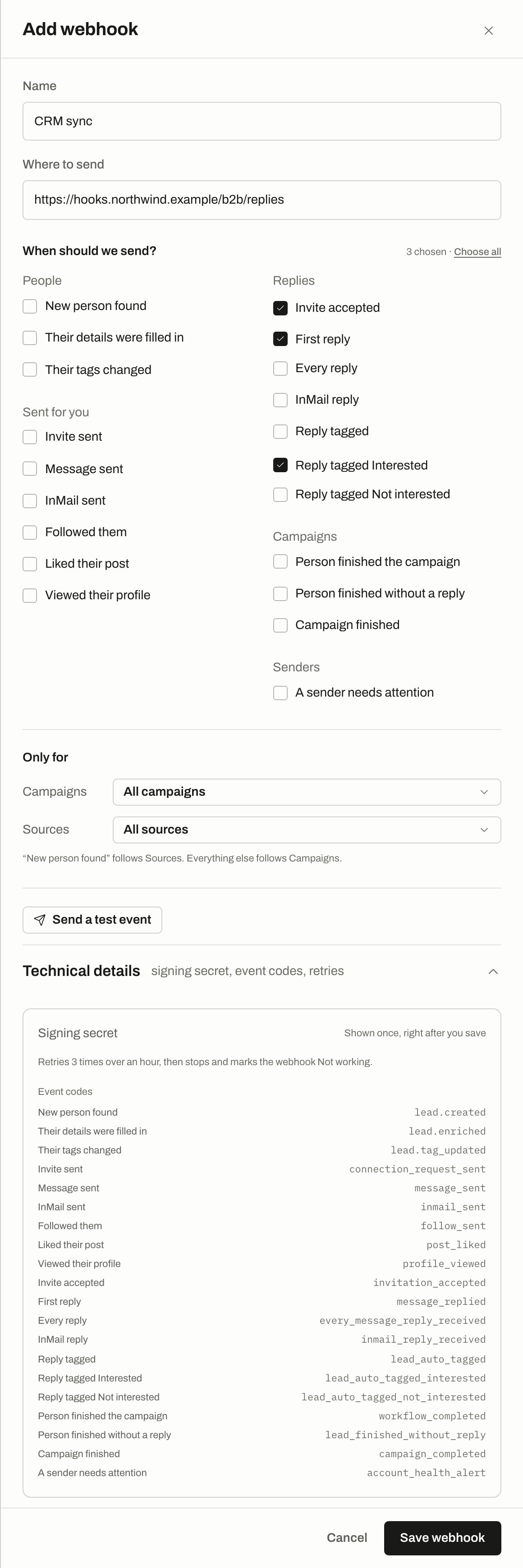
Add webhook, filled in, with three events ticked and Technical details open: the signing secret note, the retry rule and every event code.
What we send
Each event is aPOST with a JSON body:
tenant_id is your workspace’s id. data depends on the event.
Headers
Check it came from us
CompareX-Webhook-Secret with your signing secret, and reject the request if they differ. The header holds the secret itself, not a signature of the body, so use HTTPS to keep it private.
A test event sent before you save has no secret header, because the webhook has no secret yet.
Handle repeats
Your tool can occasionally receive the same event twice. UseX-Webhook-Delivery to drop repeats.
Answer and retries
Answer with any2xx within 5 seconds. Anything else counts as a failure, including a redirect, because we don’t follow them. Do slow work after you answer.
After a failed first try, we retry 3 times over an hour:
If the last retry fails, the webhook is marked Not working. From then on:
- it gets no new events,
- its other waiting retries are cancelled,
- events that happen while it’s stopped aren’t saved or sent later.
Get it working again
Fix your tool, then press Try again in the list. We send one test event. If your tool answers with a2xx, new events flow again. If not, it stays Not working.
Editing the webhook doesn’t restart it. Only Try again does.
Status in the list
Only for
Use Only for to limit a webhook. Leaving a list empty means all of them.
Events with no
workflow_id are always delivered, whatever you picked under Campaigns. That includes sender alerts, tag changes, and reply events on chats that aren’t tied to a campaign.
New campaigns and sources aren’t added on their own.
Events
Event codes in Technical details on each webhook shows the same list. Ids in payloads can benull when we don’t have them. workflow_id is a campaign’s id, run_id is one person’s journey through a campaign, and lead_id is the person. Older names like agent_id refer to the source that found them.
People
lead.created and lead.enriched have this data:
lead.tag_updated covers the tags you put on a person, not the reply tags in Inbox:
Sent for you
Each has this
data:
Replies
Reply tag events fire only for tags we set, not when you change a tag by hand in Inbox.
invitation_accepted, message_replied and inmail_reply_received have this data:
every_message_reply_received has run_id, workflow_id, lead_id, chat_id, reply_text, reply_intent and occurred_at.
The three reply tag events have run_id, workflow_id, lead_id, chat_id, tag, confidence and occurred_at. tag is one of interested, meeting_request, question, objection, not_interested, out_of_office or neutral.
Campaigns
Campaign finished fires when nobody is left in progress in the campaign right now. It can fire again if you add more people later.
Senders
Test event
Send a test event and Try again sendwebhook.test. It has made-up data in the lead.created shape. You can’t subscribe to it. Make sure your tool accepts unknown event names without failing.
Turn a webhook off
Open it and switch On off, then press Save webhook. It stops getting events and you can turn it back on later. Delete… removes it for good, after you confirm. Nothing more is sent to it, and you can’t undo this.Troubleshooting
That address can't be used
That address can't be used
We only send to public addresses. Addresses inside a private network, and names that lead to one, are refused when you save and again at every delivery. A name we can’t find yet can be saved, but deliveries fail until it resolves. A webhook that has never worked and points at a private address goes straight to Not working, with no retries.
Your tool answered with an error
Your tool answered with an error
We show the status it sent back. Check the address and what your tool accepts. A
405 or 404 often means the address is wrong for a POST.Your tool didn't answer
Your tool didn't answer
It didn’t answer within 5 seconds, or we couldn’t connect. Check the address and that your tool is running.
I lost my signing secret
I lost my signing secret
It’s shown once, and after that only the last 4 characters. To get a new one, delete the webhook and add it again, then update your tool.
I missed events while it was Not working
I missed events while it was Not working
They aren’t sent later. To catch up, use the REST API.
Related
Developers overview
API, permissions and limits.
Integrations
Send people in from another tool.