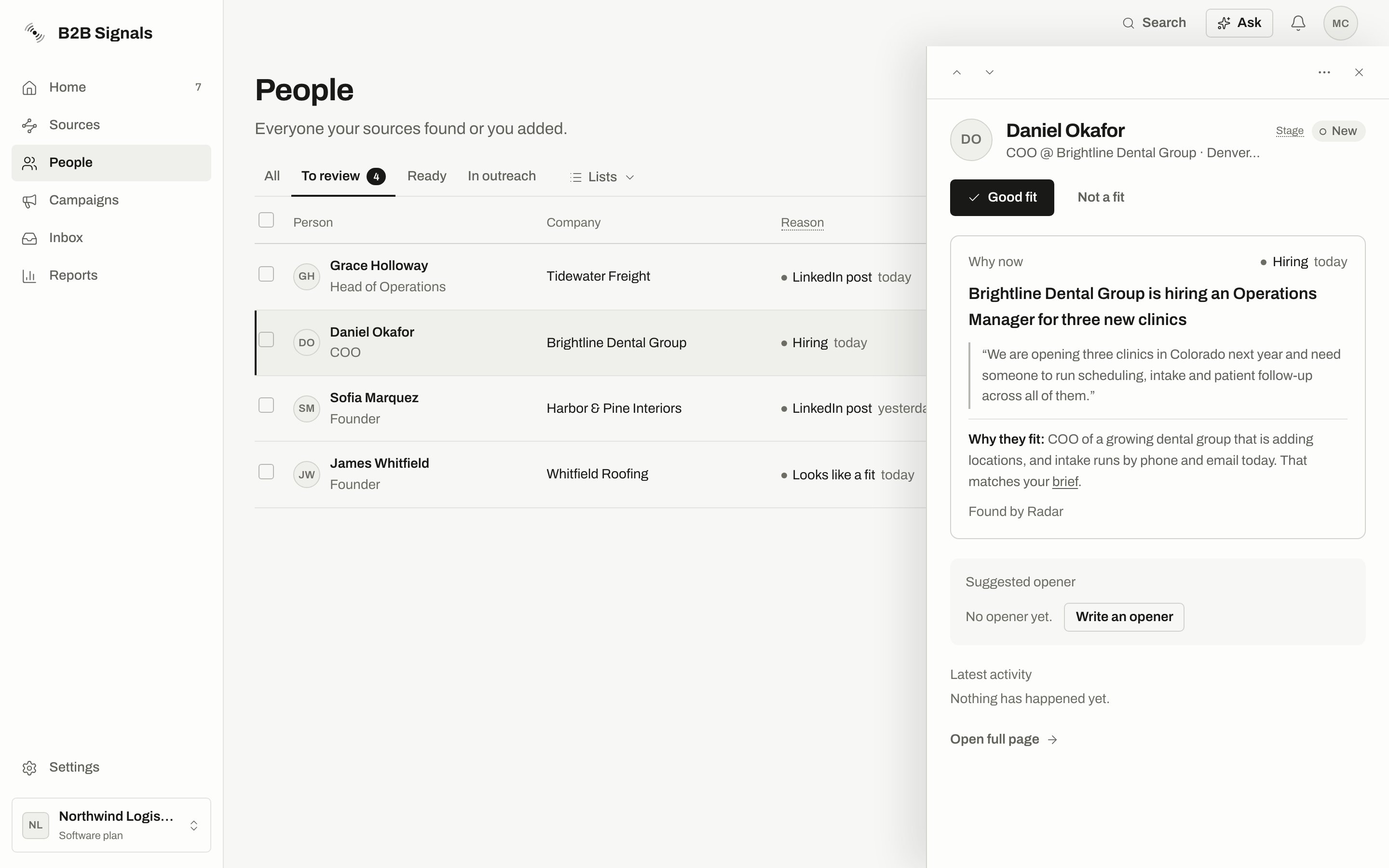
People from a source with review on wait at Stage New in To review. They stay out of every campaign until you mark them Good fit. Adding them by hand doesn’t get around this: they are skipped with the reason Waiting for your review, and the dialog says: “Mark them Good fit first. The review switch is in the Radar menu (Where new people go) and in each watchlist’s settings.”
Source
Review by default
Radar
On
More people at their company
On
Everything else, including watchlists and CSV imports
Off
People from a source with review off are never held by this rule and don’t show in To review. Find them in All.Owners and admins can change the setting:
Radar: open the Radar menu, choose Where new people go, and use Review new people before campaigns.
A watchlist: open the watchlist menu, choose Settings, and use Review new people before campaigns. This setting applies to that watchlist.
A campaign can also hold people for review through its own rule for who joins automatically. Good fit releases them too.
In People, choose the To review tab and click a person. The panel shows why now, how well they match your ideal customer and a suggested opener.
The person panel for someone at Stage New: Good fit and Not a fit at the top, then Why now and the suggested opener.
2
Read the fit line
Under Why now, one line says how well they match, based on the AI fit check’s score:
Label
What it means
Why they fit:
A good match. The reason follows.
Fit check:
A partial match, or the check said nothing about the person. Read it before you decide.
Fit check: Doesn’t match your ideal customer:
The check found they don’t match. The reason follows.
When the reason is about location and was judged on the company, the line adds which place was compared, for example “(The location compared is the company’s: Berlin.)”. The line is hidden for people marked Not a fit.
3
Decide
Choose Good fit or Not a fit. You can undo either one from the message that appears.
4
Go to the next person
Use the arrows or the arrow keys. To decide for many at once, tick them and use Set stage.
Not by itself. In most cases, you add the person to a campaign afterwards.The exception is a running campaign already connected to this person’s list, source or Radar. If that campaign would have taken them, Good fit releases them into it. All the campaign’s usual checks still apply. You see this in the message: N started in campaigns after a bulk change, or Added to a campaign automatically on one person.
Undo takes a Good fit back to New and removes an opener written by that Good fit, unless you edited it. Undo doesn’t take the person out of a campaign they already started. Use Remove from campaign for that.
Tick them in Ready and choose Add to campaign in the bulk bar. Or open one person and choose Add to campaign in the panel.
2
Choose the campaign
Pick from the list under Choose a campaign. Running, paused and draft campaigns are offered. Archived ones aren’t. With no campaigns yet, make one in Campaigns first.
3
Read the check
The dialog counts who will be added and who will be skipped. Choose why? to see each reason. It also tells you how the first message goes out.
The check before anyone joins: 4 will be added, 2 skipped, with each reason under why?.
4
Confirm
Choose Add N people, where N is the number being added. You can add up to 500 people at a time.
Read the line about the first message. A campaign on Autopilot sends without a check by you.
A New person’s panel shows Good fit first. Add to campaign appears after you mark them. The bulk bar always offers Add to campaign, but anyone still waiting for review is skipped. See every skip reason in Add people to a campaign.
Not a fit takes a person out of your lists and stops outreach to them. It deletes nothing.Choose Not a fit in the panel, then a reason or Skip the reason. The reasons are Wrong person, Wrong company, Wrong role, Not who I sell to, Old signal, Weak signal, Already have them and Something else. For a person found by Radar, this teaches Radar what to avoid.
What it stops
Detail
Lists
They leave All, To review, Ready and In outreach.
New campaigns
Automatic adding skips them. Adding by hand skips them as Rejected earlier until you recover them.
Running campaigns
All their running steps stop, including messages waiting in Approvals or Manual sends. Those drafts are discarded and can’t be approved or sent.
Not a fit doesn’t take back a message that has already gone out, and it doesn’t put the person on Do not contact.
Open the Not a fit view with the link under the table, N people marked Not a fit. You can also choose Not a fit in the Stage filter.Use Marked by to filter by who decided: Anyone, You, Radar, Campaign rule or CSV import. The view lists up to 200 people. To get the full list, choose Export all as CSV from the ⋯ menu.Choose Recover on a row, or select several and use Recover. The person goes back to their earlier place in People.
Recover doesn’t restart anything that stopped. To contact the person again, add them to a campaign.
Some rows can’t be recovered from here, for example people Radar filtered out on its own. These rows have no Recover button. The view says so: “Nobody here is deleted. Recover brings people back, and Radar learns from it. Rows without Recover can’t be recovered from here yet.”
Hiding only tidies the Not a fit view. A hidden person is still Not a fit.
Hide [name] removes one row. Use Show to see Not hidden, Hidden or Everyone, and Unhide to bring a row back. Unhiding doesn’t add them to any campaign.
Hide everyone like this… hides people marked for the same reason. They never come back as New. Turn on Also hide new people marked for this reason to keep doing this, saved as a rule.
Hide · not worth it on Home is different. It only removes someone from Home’s Worth a message. Their stage and campaigns don’t change.
Auto-recover rules… in the view’s ⋯ menu checks everyone marked Not a fit every day.
1
Choose New rule
Pick When the reason is, and optionally And it says to match a word in the reason.
2
Choose what happens
Under Then, pick Bring them back to To review or Keep them hidden. Bring them back to To review only works on people filtered out of signal sources. It doesn’t bring back people you marked yourself or people Radar passed over.
3
Save
Leave Also apply to the last 30 days on to include recent people. Choose Save rule. You can turn a rule off or remove it later.
Every way to add people, and why someone is skipped.
Do not contact
Stop contact for good, not only for a fit decision.
Radar
How your decisions shape who Radar brings.
{"docsConfig":{"theme":"mint","$schema":"https://mintlify.com/docs.json","name":"B2B Signals","description":"Find the people worth contacting right now, and reach them on LinkedIn and email.","colors":{"primary":"#191918","light":"#FDFDFC","dark":"#191918"},"logo":{"light":"https://mintcdn.com/b2-b-signals-llc/u5yYe4FZtFc5vtD_/logo/light.svg?fit=max\u0026auto=format\u0026n=u5yYe4FZtFc5vtD_\u0026q=85\u0026s=c8e807c41e5d009f2602d011f5ea437b","dark":"https://mintcdn.com/b2-b-signals-llc/u5yYe4FZtFc5vtD_/logo/dark.svg?fit=max\u0026auto=format\u0026n=u5yYe4FZtFc5vtD_\u0026q=85\u0026s=154162a91a97ee097fd9d1a3980c621f"},"favicon":"https://mintcdn.com/b2-b-signals-llc/u5yYe4FZtFc5vtD_/favicon.svg?fit=max\u0026auto=format\u0026n=u5yYe4FZtFc5vtD_\u0026q=85\u0026s=b62813d47d7e54d14cc0971ca5f7aeed","navbar":{"primary":{"type":"button","label":"Open B2B Signals","href":"https://app.b2bsignals.ai"}},"styling":{"latex":false},"navigation":{"pages":[]}},"deployment":{"deploymentMetadataValue":{"subdomain":"b2-b-signals-llc","hasAudioNarration":false,"actualSubdomain":"b2-b-signals-llc","customDomains":[],"gitSource":{"type":"github","owner":"vladdehtiarov","repo":"b2b-signals-docs","deployBranch":"main","contentDirectory":"","isPrivate":true,"mountPath":"","label":"","_id":"6ae943733464b837db7d9aad"},"chroma":{"latestBuiltDeploymentHistoryId":"6ae9439d3464b837db7d9d59","collectionId":"20047b6a-9c42-4cdc-8880-9c2000e651d0","liveDeploymentHistoryId":"6ae9439d3464b837db7d9d59","schemaVersion":"v3"},"entitlements":{"AI_CHAT":{"status":"ENABLED"},"WEB_MCP":{"status":"ENABLED"},"NARRATION":{"status":"ENABLED"}},"buildId":"6ae9be55626a14a9d452a483","clientVersion":"0.0.4045","searchFilterCounts":[{"language":"default","tag":"Getting Started","count":2}]},"assistantConfig":{"enableAskAiButton":false,"enableStarterQuestions":false,"enableContextualStarterQuestions":false,"enableAskAiSearchBar":true},"basePath":"","hasChatPermissions":true,"hasWebMcpPermissions":true,"toggles":[{"name":"kill-isr","enabled":true,"variant":{"name":"disabled","enabled":false,"feature_enabled":true},"impressionData":false},{"name":"agent-mintlify-slack","enabled":true,"variant":{"name":"disabled","enabled":false,"feature_enabled":true},"impressionData":false},{"name":"agent-integrations-settings","enabled":true,"variant":{"name":"disabled","enabled":false,"feature_enabled":true},"impressionData":false},{"name":"automations-pr-grouping","enabled":true,"variant":{"name":"disabled","enabled":false,"feature_enabled":true},"impressionData":false},{"name":"custom-prefix","enabled":true,"variant":{"name":"disabled","enabled":false,"feature_enabled":true},"impressionData":false},{"name":"analytics-v7","enabled":true,"variant":{"name":"disabled","enabled":false,"feature_enabled":true},"impressionData":false},{"name":"user-flows-analytics","enabled":true,"variant":{"name":"disabled","enabled":false,"feature_enabled":true},"impressionData":false},{"name":"no-publish-flow","enabled":true,"variant":{"name":"disabled","enabled":false,"feature_enabled":true},"impressionData":false},{"name":"workos-onboarding","enabled":true,"variant":{"name":"disabled","enabled":false,"feature_enabled":true},"impressionData":false},{"name":"llms-txt-v2","enabled":true,"variant":{"name":"disabled","enabled":false,"feature_enabled":true},"impressionData":false},{"name":"snapshot-serving-live","enabled":true,"variant":{"name":"disabled","enabled":false,"feature_enabled":true},"impressionData":false},{"name":"stripTemperatureMiddleware","enabled":true,"variant":{"name":"disabled","enabled":false,"feature_enabled":true},"impressionData":false},{"name":"support-platform-pylon-zendesk","enabled":true,"variant":{"name":"disabled","enabled":false,"feature_enabled":true},"impressionData":false},{"name":"snapshot-serving","enabled":true,"variant":{"name":"disabled","enabled":false,"feature_enabled":true},"impressionData":false},{"name":"instant-rollback","enabled":true,"variant":{"name":"disabled","enabled":false,"feature_enabled":true},"impressionData":false},{"name":"granular-notifications-server","enabled":true,"variant":{"name":"disabled","enabled":false,"feature_enabled":true},"impressionData":false},{"name":"granular-notifications","enabled":true,"variant":{"name":"disabled","enabled":false,"feature_enabled":true},"impressionData":false},{"name":"automations-fable","enabled":true,"variant":{"name":"disabled","enabled":false,"feature_enabled":true},"impressionData":false},{"name":"fixed-ai-action-pricing","enabled":true,"variant":{"name":"disabled","enabled":false,"feature_enabled":true},"impressionData":false},{"name":"automation-resolve-merge-conflict","enabled":true,"variant":{"name":"disabled","enabled":false,"feature_enabled":true},"impressionData":false},{"name":"scoped-publishing","enabled":true,"variant":{"name":"disabled","enabled":false,"feature_enabled":true},"impressionData":false},{"name":"mintql","enabled":true,"variant":{"name":"disabled","enabled":false,"feature_enabled":true},"impressionData":false},{"name":"page-level-analytics","enabled":true,"variant":{"name":"disabled","enabled":false,"feature_enabled":true},"impressionData":false},{"name":"editor-version-history-v2","enabled":true,"variant":{"name":"disabled","enabled":false,"feature_enabled":true},"impressionData":false},{"name":"billing-page-v2","enabled":true,"variant":{"name":"disabled","enabled":false,"feature_enabled":true},"impressionData":false},{"name":"full-page-search","enabled":true,"variant":{"name":"disabled","enabled":false,"feature_enabled":true},"impressionData":false},{"name":"workspace-projects","enabled":true,"variant":{"name":"disabled","enabled":false,"feature_enabled":true},"impressionData":false},{"name":"assistant-v5","enabled":true,"variant":{"name":"disabled","enabled":false,"feature_enabled":true},"impressionData":false},{"name":"byok-sep-25","enabled":true,"variant":{"name":"disabled","enabled":false,"feature_enabled":true},"impressionData":false},{"name":"fork-pr-previews","enabled":true,"variant":{"name":"disabled","enabled":false,"feature_enabled":true},"impressionData":false},{"name":"revalidation-jwt","enabled":true,"variant":{"name":"disabled","enabled":false,"feature_enabled":true},"impressionData":false},{"name":"vite-origin","enabled":true,"variant":{"name":"disabled","enabled":false,"feature_enabled":true},"impressionData":false},{"name":"billing-updated-9-15","enabled":true,"variant":{"name":"disabled","enabled":false,"feature_enabled":true},"impressionData":false},{"name":"workos-sso-scim","enabled":true,"variant":{"name":"disabled","enabled":false,"feature_enabled":true},"impressionData":false},{"name":"hobby-abuse-scan","enabled":true,"variant":{"name":"disabled","enabled":false,"feature_enabled":true},"impressionData":false},{"name":"dashboard-inbox","enabled":true,"variant":{"name":"disabled","enabled":false,"feature_enabled":true},"impressionData":false},{"name":"workos-signup","enabled":true,"variant":{"name":"disabled","enabled":false,"feature_enabled":true},"impressionData":false},{"name":"turbopuffer-dual-write","enabled":true,"variant":{"name":"disabled","enabled":false,"feature_enabled":true},"impressionData":false},{"name":"workos-enabled","enabled":true,"variant":{"name":"disabled","enabled":false,"feature_enabled":true},"impressionData":false},{"name":"approve-review-flow","enabled":true,"variant":{"name":"disabled","enabled":false,"feature_enabled":true},"impressionData":false},{"name":"sso-setup-deadline-banner","enabled":true,"variant":{"name":"disabled","enabled":false,"feature_enabled":true},"impressionData":false}],"googleFontsInlined":false},"customCss":[],"page":{"pagePath":"people/review","slug":"/people/review","pageMetadata":{"title":"Review people","description":"Mark people Good fit or Not a fit, see what each choice starts or stops, recover anyone, and add reviewed people to a campaign.","href":"/people/review"},"description":{"compiledSource":"\"use strict\";\nconst {jsx: _jsx} = arguments[0];\nconst {useMDXComponents: _provideComponents} = arguments[0];\nfunction _createMdxContent(props) {\n const _components = {\n p: \"p\",\n ..._provideComponents(),\n ...props.components\n };\n return _jsx(_components.p, {\n children: \"Mark people Good fit or Not a fit, see what each choice starts or stops, recover anyone, and add reviewed people to a campaign.\"\n });\n}\nfunction MDXContent(props = {}) {\n const {wrapper: MDXLayout} = {\n ..._provideComponents(),\n ...props.components\n };\n return MDXLayout ? _jsx(MDXLayout, {\n ...props,\n children: _jsx(_createMdxContent, {\n ...props\n })\n }) : _createMdxContent(props);\n}\nreturn {\n default: MDXContent\n};\n","frontmatter":{},"scope":{}},"pageType":"default","mdx":{"mdxSource":{"compiledSource":"\"use strict\";const{Fragment:_Fragment,jsx:_jsx,jsxs:_jsxs}=arguments[0];const{useMDXComponents:_provideComponents}=arguments[0];function _createMdxContent(props){const _components={a:`a`,li:`li`,p:`p`,strong:`strong`,tbody:`tbody`,td:`td`,th:`th`,thead:`thead`,tr:`tr`,ul:`ul`,..._provideComponents(),...props.components},{Card,CardGroup,Frame,Heading,Note,OptimizedImage,Step,Steps,Table,Warning}=_components;if(!Card)_missingMdxReference(`Card`,true);if(!CardGroup)_missingMdxReference(`CardGroup`,true);if(!Frame)_missingMdxReference(`Frame`,true);if(!Heading)_missingMdxReference(`Heading`,true);if(!Note)_missingMdxReference(`Note`,true);if(!OptimizedImage)_missingMdxReference(`OptimizedImage`,true);if(!Step)_missingMdxReference(`Step`,true);if(!Steps)_missingMdxReference(`Steps`,true);if(!Table)_missingMdxReference(`Table`,true);if(!Warning)_missingMdxReference(`Warning`,true);return _jsxs(_Fragment,{children:[_jsxs(_components.p,{children:[`Review decides who is worth contacting before a campaign writes to them. You mark each person `,_jsx(_components.strong,{children:`Good fit`}),` or `,_jsx(_components.strong,{children:`Not a fit`}),`.`]}),`\n`,_jsx(Heading,{level:`2`,id:`which-sources-wait-for-review`,children:`Which sources wait for review`}),`\n`,_jsxs(_components.p,{children:[`People from a source with review on wait at Stage New in `,_jsx(_components.strong,{children:`To review`}),`. They stay out of every campaign until you mark them Good fit. Adding them by hand doesn’t get around this: they are skipped with the reason `,_jsx(_components.strong,{children:`Waiting for your review`}),`, and the dialog says: “Mark them Good fit first. The review switch is in the Radar menu (Where new people go) and in each watchlist’s settings.”`]}),`\n`,_jsxs(Table,{children:[_jsx(_components.thead,{children:_jsxs(_components.tr,{children:[_jsx(_components.th,{children:`Source`}),_jsx(_components.th,{children:`Review by default`})]})}),_jsxs(_components.tbody,{children:[_jsxs(_components.tr,{children:[_jsx(_components.td,{children:`Radar`}),_jsx(_components.td,{children:`On`})]}),_jsxs(_components.tr,{children:[_jsx(_components.td,{children:`More people at their company`}),_jsx(_components.td,{children:`On`})]}),_jsxs(_components.tr,{children:[_jsx(_components.td,{children:`Everything else, including watchlists and CSV imports`}),_jsx(_components.td,{children:`Off`})]})]})]}),`\n`,_jsxs(_components.p,{children:[`People from a source with review off are never held by this rule and don’t show in `,_jsx(_components.strong,{children:`To review`}),`. Find them in `,_jsx(_components.strong,{children:`All`}),`.`]}),`\n`,_jsx(_components.p,{children:`Owners and admins can change the setting:`}),`\n`,_jsxs(_components.ul,{children:[`\n`,_jsxs(_components.li,{children:[_jsx(_components.strong,{children:`Radar:`}),` open the Radar menu, choose `,_jsx(_components.strong,{children:`Where new people go`}),`, and use `,_jsx(_components.strong,{children:`Review new people before campaigns`}),`.`]}),`\n`,_jsxs(_components.li,{children:[_jsx(_components.strong,{children:`A watchlist:`}),` open the watchlist menu, choose `,_jsx(_components.strong,{children:`Settings`}),`, and use `,_jsx(_components.strong,{children:`Review new people before campaigns`}),`. This setting applies to that watchlist.`]}),`\n`]}),`\n`,_jsx(_components.p,{children:`A campaign can also hold people for review through its own rule for who joins automatically. Good fit releases them too.`}),`\n`,_jsx(Heading,{level:`2`,id:`review-a-person`,children:`Review a person`}),`\n`,_jsxs(Steps,{children:[_jsxs(Step,{title:`Open To review`,children:[_jsxs(_components.p,{children:[`In `,_jsx(_components.strong,{children:`People`}),`, choose the `,_jsx(_components.strong,{children:`To review`}),` tab and click a person. The panel shows why now, how well they match your ideal customer and a suggested opener.`]}),_jsx(Frame,{caption:`The person panel for someone at Stage New: Good fit and Not a fit at the top, then Why now and the suggested opener.`,children:_jsx(OptimizedImage,{src:`https://mintcdn.com/b2-b-signals-llc/u5yYe4FZtFc5vtD_/images/people/person-panel-new.png?fit=max\u0026auto=format\u0026n=u5yYe4FZtFc5vtD_\u0026q=85\u0026s=dbfcf98783ea610370e5e476d5a5e05c`,alt:`Person panel for Daniel Okafor, COO at Brightline Dental Group, Stage New, with Good fit and Not a fit buttons and a Why now card about hiring`,\"data-og-width\":`2880`,width:`2880`,\"data-og-height\":`1800`,height:`1800`,\"data-path\":`images/people/person-panel-new.png`,\"data-optimize\":`true`,\"data-opv\":`3`,srcset:`https://mintcdn.com/b2-b-signals-llc/u5yYe4FZtFc5vtD_/images/people/person-panel-new.png?w=280\u0026fit=max\u0026auto=format\u0026n=u5yYe4FZtFc5vtD_\u0026q=85\u0026s=7b464f87c39c5d01f57ad607a84d603d 280w, https://mintcdn.com/b2-b-signals-llc/u5yYe4FZtFc5vtD_/images/people/person-panel-new.png?w=560\u0026fit=max\u0026auto=format\u0026n=u5yYe4FZtFc5vtD_\u0026q=85\u0026s=7c668ce0314777f3504b75d07e834c3f 560w, https://mintcdn.com/b2-b-signals-llc/u5yYe4FZtFc5vtD_/images/people/person-panel-new.png?w=840\u0026fit=max\u0026auto=format\u0026n=u5yYe4FZtFc5vtD_\u0026q=85\u0026s=65996fa553252fb598c4632fd4bb2356 840w, https://mintcdn.com/b2-b-signals-llc/u5yYe4FZtFc5vtD_/images/people/person-panel-new.png?w=1100\u0026fit=max\u0026auto=format\u0026n=u5yYe4FZtFc5vtD_\u0026q=85\u0026s=ae63cc83334998cbffff139a435a093a 1100w, https://mintcdn.com/b2-b-signals-llc/u5yYe4FZtFc5vtD_/images/people/person-panel-new.png?w=1650\u0026fit=max\u0026auto=format\u0026n=u5yYe4FZtFc5vtD_\u0026q=85\u0026s=d72705e13853a5f3a5eff4e3e9f7ed33 1650w, https://mintcdn.com/b2-b-signals-llc/u5yYe4FZtFc5vtD_/images/people/person-panel-new.png?w=2500\u0026fit=max\u0026auto=format\u0026n=u5yYe4FZtFc5vtD_\u0026q=85\u0026s=4f2c50daa7e1e019aa140229f542a1c4 2500w`})})]}),_jsxs(Step,{title:`Read the fit line`,children:[_jsxs(_components.p,{children:[`Under `,_jsx(_components.strong,{children:`Why now`}),`, one line says how well they match, based on the AI fit check’s score:`]}),_jsxs(Table,{children:[_jsx(_components.thead,{children:_jsxs(_components.tr,{children:[_jsx(_components.th,{children:`Label`}),_jsx(_components.th,{children:`What it means`})]})}),_jsxs(_components.tbody,{children:[_jsxs(_components.tr,{children:[_jsx(_components.td,{children:_jsx(_components.strong,{children:`Why they fit:`})}),_jsx(_components.td,{children:`A good match. The reason follows.`})]}),_jsxs(_components.tr,{children:[_jsx(_components.td,{children:_jsx(_components.strong,{children:`Fit check:`})}),_jsx(_components.td,{children:`A partial match, or the check said nothing about the person. Read it before you decide.`})]}),_jsxs(_components.tr,{children:[_jsxs(_components.td,{children:[_jsx(_components.strong,{children:`Fit check:`}),` Doesn’t match your ideal customer:`]}),_jsx(_components.td,{children:`The check found they don’t match. The reason follows.`})]})]})]}),_jsxs(_components.p,{children:[`When the reason is about location and was judged on the company, the line adds which place was compared, for example “(The location compared is the company’s: Berlin.)”. The line is hidden for people marked `,_jsx(_components.strong,{children:`Not a fit`}),`.`]})]}),_jsx(Step,{title:`Decide`,children:_jsxs(_components.p,{children:[`Choose `,_jsx(_components.strong,{children:`Good fit`}),` or `,_jsx(_components.strong,{children:`Not a fit`}),`. You can undo either one from the message that appears.`]})}),_jsx(Step,{title:`Go to the next person`,children:_jsxs(_components.p,{children:[`Use the arrows or the arrow keys. To decide for many at once, tick them and use `,_jsx(_components.strong,{children:`Set stage`}),`.`]})})]}),`\n`,_jsx(Heading,{level:`2`,id:`good-fit`,children:`Good fit`}),`\n`,_jsxs(_components.p,{children:[`Good fit moves the person to the `,_jsx(_components.strong,{children:`Ready`}),` tab. It sends nothing by itself.`]}),`\n`,_jsxs(Table,{children:[_jsx(_components.thead,{children:_jsxs(_components.tr,{children:[_jsx(_components.th,{children:`What happens`}),_jsx(_components.th,{children:`Detail`})]})}),_jsxs(_components.tbody,{children:[_jsxs(_components.tr,{children:[_jsx(_components.td,{children:`Stage`}),_jsx(_components.td,{children:`Moves to Good fit, unless they are already further along, such as Replied.`})]}),_jsxs(_components.tr,{children:[_jsx(_components.td,{children:`Hidden people`}),_jsx(_components.td,{children:`A person who was hidden as Not a fit comes back.`})]}),_jsxs(_components.tr,{children:[_jsx(_components.td,{children:`Opener`}),_jsx(_components.td,{children:`If they have none, a suggested opener is written for them.`})]}),_jsxs(_components.tr,{children:[_jsx(_components.td,{children:`Radar`}),_jsx(_components.td,{children:`A person found by Radar teaches it what you like.`})]}),_jsxs(_components.tr,{children:[_jsx(_components.td,{children:`Campaigns`}),_jsx(_components.td,{children:`They start only in running campaigns already set up to take them. See below.`})]})]})]}),`\n`,_jsx(Heading,{level:`3`,id:`does-good-fit-start-outreach`,children:`Does Good fit start outreach?`}),`\n`,_jsx(_components.p,{children:`Not by itself. In most cases, you add the person to a campaign afterwards.`}),`\n`,_jsxs(_components.p,{children:[`The exception is a running campaign already connected to this person’s list, source or Radar. If that campaign would have taken them, Good fit releases them into it. All the campaign’s usual checks still apply. You see this in the message: `,_jsx(_components.strong,{children:`N started in campaigns`}),` after a bulk change, or `,_jsx(_components.strong,{children:`Added to a campaign automatically`}),` on one person.`]}),`\n`,_jsx(Warning,{children:_jsxs(_components.p,{children:[`Undo takes a Good fit back to New and removes an opener written by that Good fit, unless you edited it. Undo doesn’t take the person out of a campaign they already started. Use `,_jsx(_components.a,{href:`/people/enrich-and-export#remove-from-a-campaign`,children:`Remove from campaign`}),` for that.`]})}),`\n`,_jsx(Heading,{level:`2`,id:`add-reviewed-people-to-a-campaign`,children:`Add reviewed people to a campaign`}),`\n`,_jsxs(Steps,{children:[_jsx(Step,{title:`Choose the people`,children:_jsxs(_components.p,{children:[`Tick them in `,_jsx(_components.strong,{children:`Ready`}),` and choose `,_jsx(_components.strong,{children:`Add to campaign`}),` in the bulk bar. Or open one person and choose `,_jsx(_components.strong,{children:`Add to campaign`}),` in the panel.`]})}),_jsx(Step,{title:`Choose the campaign`,children:_jsxs(_components.p,{children:[`Pick from the list under `,_jsx(_components.strong,{children:`Choose a campaign`}),`. Running, paused and draft campaigns are offered. Archived ones aren’t. With no campaigns yet, make one in `,_jsx(_components.a,{href:`/campaigns/create`,children:`Campaigns`}),` first.`]})}),_jsxs(Step,{title:`Read the check`,children:[_jsxs(_components.p,{children:[`The dialog counts who will be added and who will be skipped. Choose `,_jsx(_components.strong,{children:`why?`}),` to see each reason. It also tells you how the first message goes out.`]}),_jsx(Frame,{caption:`The check before anyone joins: 4 will be added, 2 skipped, with each reason under why?.`,children:_jsx(OptimizedImage,{src:`https://mintcdn.com/b2-b-signals-llc/u5yYe4FZtFc5vtD_/images/people/add-to-campaign-why.png?fit=max\u0026auto=format\u0026n=u5yYe4FZtFc5vtD_\u0026q=85\u0026s=6c8f69a63cf3e6a92166a7def76f4394`,alt:`Add to a campaign dialog: 4 people will be added, 2 will be skipped, with the reasons In another campaign and Waiting for your review`,\"data-og-width\":`848`,width:`848`,\"data-og-height\":`1314`,height:`1314`,\"data-path\":`images/people/add-to-campaign-why.png`,\"data-optimize\":`true`,\"data-opv\":`3`,srcset:`https://mintcdn.com/b2-b-signals-llc/u5yYe4FZtFc5vtD_/images/people/add-to-campaign-why.png?w=280\u0026fit=max\u0026auto=format\u0026n=u5yYe4FZtFc5vtD_\u0026q=85\u0026s=312d18d1aeead285a5b5f67623bb9d35 280w, https://mintcdn.com/b2-b-signals-llc/u5yYe4FZtFc5vtD_/images/people/add-to-campaign-why.png?w=560\u0026fit=max\u0026auto=format\u0026n=u5yYe4FZtFc5vtD_\u0026q=85\u0026s=c2f7c2524da1c93f5d2b25a244e92e12 560w, https://mintcdn.com/b2-b-signals-llc/u5yYe4FZtFc5vtD_/images/people/add-to-campaign-why.png?w=840\u0026fit=max\u0026auto=format\u0026n=u5yYe4FZtFc5vtD_\u0026q=85\u0026s=6e89287976193a1b1d30b8498f2f887b 840w, https://mintcdn.com/b2-b-signals-llc/u5yYe4FZtFc5vtD_/images/people/add-to-campaign-why.png?w=1100\u0026fit=max\u0026auto=format\u0026n=u5yYe4FZtFc5vtD_\u0026q=85\u0026s=5c71bb4256aed49aa8a4b03e3d7b977c 1100w, https://mintcdn.com/b2-b-signals-llc/u5yYe4FZtFc5vtD_/images/people/add-to-campaign-why.png?w=1650\u0026fit=max\u0026auto=format\u0026n=u5yYe4FZtFc5vtD_\u0026q=85\u0026s=aa961235e21f889e3ee1c3b17f2173e4 1650w, https://mintcdn.com/b2-b-signals-llc/u5yYe4FZtFc5vtD_/images/people/add-to-campaign-why.png?w=2500\u0026fit=max\u0026auto=format\u0026n=u5yYe4FZtFc5vtD_\u0026q=85\u0026s=76c4433ee20c15e096f325e8db47535f 2500w`})})]}),_jsx(Step,{title:`Confirm`,children:_jsxs(_components.p,{children:[`Choose `,_jsx(_components.strong,{children:`Add N people`}),`, where N is the number being added. You can add up to 500 people at a time.`]})})]}),`\n`,_jsx(Warning,{children:_jsx(_components.p,{children:`Read the line about the first message. A campaign on Autopilot sends without a check by you.`})}),`\n`,_jsxs(_components.p,{children:[`A New person’s panel shows `,_jsx(_components.strong,{children:`Good fit`}),` first. `,_jsx(_components.strong,{children:`Add to campaign`}),` appears after you mark them. The bulk bar always offers `,_jsx(_components.strong,{children:`Add to campaign`}),`, but anyone still waiting for review is skipped. See every skip reason in `,_jsx(_components.a,{href:`/campaigns/add-people`,children:`Add people to a campaign`}),`.`]}),`\n`,_jsx(Heading,{level:`2`,id:`not-a-fit`,children:`Not a fit`}),`\n`,_jsx(_components.p,{children:`Not a fit takes a person out of your lists and stops outreach to them. It deletes nothing.`}),`\n`,_jsxs(_components.p,{children:[`Choose `,_jsx(_components.strong,{children:`Not a fit`}),` in the panel, then a reason or `,_jsx(_components.strong,{children:`Skip the reason`}),`. The reasons are `,_jsx(_components.strong,{children:`Wrong person`}),`, `,_jsx(_components.strong,{children:`Wrong company`}),`, `,_jsx(_components.strong,{children:`Wrong role`}),`, `,_jsx(_components.strong,{children:`Not who I sell to`}),`, `,_jsx(_components.strong,{children:`Old signal`}),`, `,_jsx(_components.strong,{children:`Weak signal`}),`, `,_jsx(_components.strong,{children:`Already have them`}),` and `,_jsx(_components.strong,{children:`Something else`}),`. For a person found by Radar, this teaches Radar what to avoid.`]}),`\n`,_jsxs(Table,{children:[_jsx(_components.thead,{children:_jsxs(_components.tr,{children:[_jsx(_components.th,{children:`What it stops`}),_jsx(_components.th,{children:`Detail`})]})}),_jsxs(_components.tbody,{children:[_jsxs(_components.tr,{children:[_jsx(_components.td,{children:`Lists`}),_jsxs(_components.td,{children:[`They leave `,_jsx(_components.strong,{children:`All`}),`, `,_jsx(_components.strong,{children:`To review`}),`, `,_jsx(_components.strong,{children:`Ready`}),` and `,_jsx(_components.strong,{children:`In outreach`}),`.`]})]}),_jsxs(_components.tr,{children:[_jsx(_components.td,{children:`New campaigns`}),_jsxs(_components.td,{children:[`Automatic adding skips them. Adding by hand skips them as `,_jsx(_components.strong,{children:`Rejected earlier`}),` until you recover them.`]})]}),_jsxs(_components.tr,{children:[_jsx(_components.td,{children:`Running campaigns`}),_jsx(_components.td,{children:`All their running steps stop, including messages waiting in Approvals or Manual sends. Those drafts are discarded and can’t be approved or sent.`})]})]})]}),`\n`,_jsxs(_components.p,{children:[`Not a fit doesn’t take back a message that has already gone out, and it doesn’t put the person on `,_jsx(_components.a,{href:`/people/do-not-contact`,children:`Do not contact`}),`.`]}),`\n`,_jsx(Heading,{level:`3`,id:`find-and-recover-someone`,children:`Find and recover someone`}),`\n`,_jsxs(_components.p,{children:[`Open the Not a fit view with the link under the table, `,_jsx(_components.strong,{children:`N people marked Not a fit`}),`. You can also choose Not a fit in the `,_jsx(_components.strong,{children:`Stage`}),` filter.`]}),`\n`,_jsxs(_components.p,{children:[`Use `,_jsx(_components.strong,{children:`Marked by`}),` to filter by who decided: `,_jsx(_components.strong,{children:`Anyone`}),`, `,_jsx(_components.strong,{children:`You`}),`, `,_jsx(_components.strong,{children:`Radar`}),`, `,_jsx(_components.strong,{children:`Campaign rule`}),` or `,_jsx(_components.strong,{children:`CSV import`}),`. The view lists up to 200 people. To get the full list, choose `,_jsx(_components.strong,{children:`Export all as CSV`}),` from the `,_jsx(_components.strong,{children:`⋯`}),` menu.`]}),`\n`,_jsxs(_components.p,{children:[`Choose `,_jsx(_components.strong,{children:`Recover`}),` on a row, or select several and use `,_jsx(_components.strong,{children:`Recover`}),`. The person goes back to their earlier place in People.`]}),`\n`,_jsx(Note,{children:_jsx(_components.p,{children:`Recover doesn’t restart anything that stopped. To contact the person again, add them to a campaign.`})}),`\n`,_jsxs(_components.p,{children:[`Some rows can’t be recovered from here, for example people Radar filtered out on its own. These rows have no `,_jsx(_components.strong,{children:`Recover`}),` button. The view says so: “Nobody here is deleted. Recover brings people back, and Radar learns from it. Rows without Recover can’t be recovered from here yet.”`]}),`\n`,_jsx(Heading,{level:`3`,id:`hide-people-from-this-view`,children:`Hide people from this view`}),`\n`,_jsx(_components.p,{children:`Hiding only tidies the Not a fit view. A hidden person is still Not a fit.`}),`\n`,_jsxs(_components.ul,{children:[`\n`,_jsxs(_components.li,{children:[_jsx(_components.strong,{children:`Hide [name]`}),` removes one row. Use `,_jsx(_components.strong,{children:`Show`}),` to see `,_jsx(_components.strong,{children:`Not hidden`}),`, `,_jsx(_components.strong,{children:`Hidden`}),` or `,_jsx(_components.strong,{children:`Everyone`}),`, and `,_jsx(_components.strong,{children:`Unhide`}),` to bring a row back. Unhiding doesn’t add them to any campaign.`]}),`\n`,_jsxs(_components.li,{children:[_jsx(_components.strong,{children:`Hide everyone like this…`}),` hides people marked for the same reason. They never come back as New. Turn on `,_jsx(_components.strong,{children:`Also hide new people marked for this reason`}),` to keep doing this, saved as a rule.`]}),`\n`]}),`\n`,_jsxs(_components.p,{children:[_jsx(_components.strong,{children:`Hide · not worth it`}),` on Home is different. It only removes someone from Home’s `,_jsx(_components.strong,{children:`Worth a message`}),`. Their stage and campaigns don’t change.`]}),`\n`,_jsx(Heading,{level:`3`,id:`rules-that-run-every-day`,children:`Rules that run every day`}),`\n`,_jsxs(_components.p,{children:[_jsx(_components.strong,{children:`Auto-recover rules…`}),` in the view’s `,_jsx(_components.strong,{children:`⋯`}),` menu checks everyone marked Not a fit every day.`]}),`\n`,_jsxs(Steps,{children:[_jsx(Step,{title:`Choose New rule`,children:_jsxs(_components.p,{children:[`Pick `,_jsx(_components.strong,{children:`When the reason is`}),`, and optionally `,_jsx(_components.strong,{children:`And it says`}),` to match a word in the reason.`]})}),_jsx(Step,{title:`Choose what happens`,children:_jsxs(_components.p,{children:[`Under `,_jsx(_components.strong,{children:`Then`}),`, pick `,_jsx(_components.strong,{children:`Bring them back to To review`}),` or `,_jsx(_components.strong,{children:`Keep them hidden`}),`. `,_jsx(_components.strong,{children:`Bring them back to To review`}),` only works on people filtered out of signal sources. It doesn’t bring back people you marked yourself or people Radar passed over.`]})}),_jsx(Step,{title:`Save`,children:_jsxs(_components.p,{children:[`Leave `,_jsx(_components.strong,{children:`Also apply to the last 30 days`}),` on to include recent people. Choose `,_jsx(_components.strong,{children:`Save rule`}),`. You can turn a rule off or remove it later.`]})})]}),`\n`,_jsx(Heading,{level:`2`,id:`related`,children:`Related`}),`\n`,_jsxs(CardGroup,{cols:2,children:[_jsx(Card,{title:`Stages`,href:`/people/stages`,children:_jsx(_components.p,{children:`What happens after Good fit.`})}),_jsx(Card,{title:`Add people to a campaign`,href:`/campaigns/add-people`,children:_jsx(_components.p,{children:`Every way to add people, and why someone is skipped.`})}),_jsx(Card,{title:`Do not contact`,href:`/people/do-not-contact`,children:_jsx(_components.p,{children:`Stop contact for good, not only for a fit decision.`})}),_jsx(Card,{title:`Radar`,href:`/sources/radar`,children:_jsx(_components.p,{children:`How your decisions shape who Radar brings.`})})]})]})}function MDXContent(props={}){const{wrapper:MDXLayout}={..._provideComponents(),...props.components};return MDXLayout?_jsx(MDXLayout,{...props,children:_jsx(_createMdxContent,{...props})}):_createMdxContent(props)}return{default:MDXContent};function _missingMdxReference(id,component){throw new Error(`Expected `+(component?`component`:`object`)+\" `\"+id+\"` to be defined: you likely forgot to import, pass, or provide it.\")}","frontmatter":{},"scope":{"config":{},"pageMetadata":{"title":"Review people","description":"Mark people Good fit or Not a fit, see what each choice starts or stops, recover anyone, and add reviewed people to a campaign.","href":"/people/review"}}},"mdxSourceWithNoJs":null},"mdxExtracts":{"tableOfContents":[{"title":"Which sources wait for review","slug":"which-sources-wait-for-review","depth":2,"children":[]},{"title":"Review a person","slug":"review-a-person","depth":2,"children":[]},{"title":"Good fit","slug":"good-fit","depth":2,"children":[{"title":"Does Good fit start outreach?","slug":"does-good-fit-start-outreach","depth":3,"children":[]}]},{"title":"Add reviewed people to a campaign","slug":"add-reviewed-people-to-a-campaign","depth":2,"children":[]},{"title":"Not a fit","slug":"not-a-fit","depth":2,"children":[{"title":"Find and recover someone","slug":"find-and-recover-someone","depth":3,"children":[]},{"title":"Hide people from this view","slug":"hide-people-from-this-view","depth":3,"children":[]},{"title":"Rules that run every day","slug":"rules-that-run-every-day","depth":3,"children":[]}]},{"title":"Related","slug":"related","depth":2,"children":[]}],"codeExamples":{}},"jsLinks":[],"subdomain":"b2-b-signals-llc","siteName":"B2B Signals","title":"Review people - B2B Signals","navMaps":{"firstHrefInVersion":{},"firstHrefInLanguage":{}},"lastModified":"2026-11-03T10:58:39.933Z","originalFileLocation":"people/review.mdx"},"headHtml":"\u003cscript data-mint-head>(function(){var d=document.documentElement,p=null;if(!p){try{p=localStorage.getItem(\"isDarkMode\")}catch(e){}if(p==='true')p='dark';else if(p==='false')p='light';if(p!=='light'\u0026\u0026p!=='dark'\u0026\u0026p!=='system')p=\"system\"}var r=p==='system'?(matchMedia(\"(prefers-color-scheme: dark)\").matches?'dark':'light'):p;d.classList.remove(r==='dark'?'light':'dark');d.classList.add(r);d.setAttribute(\"data-theme-preference\",p)})();\u003c/script>\u003cmeta data-mint-head name=\"description\" content=\"Mark people Good fit or Not a fit, see what each choice starts or stops, recover anyone, and add reviewed people to a campaign.\">\u003cmeta data-mint-head name=\"application-name\" content=\"B2B Signals\">\u003cmeta data-mint-head name=\"generator\" content=\"Mintlify\">\u003clink data-mint-head rel=\"icon\" type=\"image/png\" sizes=\"192x192\" href=\"/mintlify-assets/_mintlify/favicons/b2-b-signals-llc/V2yPkCmV8meRxeDy/_generated/favicon/android-chrome-192x192.png\" media=\"(prefers-color-scheme: light)\">\u003clink data-mint-head rel=\"apple-touch-icon\" type=\"image/png\" sizes=\"180x180\" href=\"/mintlify-assets/_mintlify/favicons/b2-b-signals-llc/V2yPkCmV8meRxeDy/_generated/favicon/apple-touch-icon.png\">\u003clink data-mint-head rel=\"icon\" type=\"image/png\" sizes=\"16x16\" href=\"/mintlify-assets/_mintlify/favicons/b2-b-signals-llc/V2yPkCmV8meRxeDy/_generated/favicon/favicon-16x16.png\" media=\"(prefers-color-scheme: light)\">\u003clink data-mint-head rel=\"icon\" type=\"image/png\" sizes=\"32x32\" href=\"/mintlify-assets/_mintlify/favicons/b2-b-signals-llc/V2yPkCmV8meRxeDy/_generated/favicon/favicon-32x32.png\" media=\"(prefers-color-scheme: light)\">\u003clink data-mint-head rel=\"shortcut icon\" type=\"image/x-icon\" href=\"/mintlify-assets/_mintlify/favicons/b2-b-signals-llc/V2yPkCmV8meRxeDy/_generated/favicon/favicon.ico\" media=\"(prefers-color-scheme: light)\">\u003clink data-mint-head rel=\"icon\" type=\"image/png\" sizes=\"192x192\" href=\"/mintlify-assets/_mintlify/favicons/b2-b-signals-llc/V2yPkCmV8meRxeDy/_generated/favicon-dark/android-chrome-192x192.png\" media=\"(prefers-color-scheme: dark)\">\u003clink data-mint-head rel=\"icon\" type=\"image/png\" sizes=\"16x16\" href=\"/mintlify-assets/_mintlify/favicons/b2-b-signals-llc/V2yPkCmV8meRxeDy/_generated/favicon-dark/favicon-16x16.png\" media=\"(prefers-color-scheme: dark)\">\u003clink data-mint-head rel=\"icon\" type=\"image/png\" sizes=\"32x32\" href=\"/mintlify-assets/_mintlify/favicons/b2-b-signals-llc/V2yPkCmV8meRxeDy/_generated/favicon-dark/favicon-32x32.png\" media=\"(prefers-color-scheme: dark)\">\u003clink data-mint-head rel=\"shortcut icon\" type=\"image/x-icon\" href=\"/mintlify-assets/_mintlify/favicons/b2-b-signals-llc/V2yPkCmV8meRxeDy/_generated/favicon-dark/favicon.ico\" media=\"(prefers-color-scheme: dark)\">\u003cmeta data-mint-head property=\"og:title\" content=\"Review people - B2B Signals\">\u003cmeta data-mint-head property=\"og:description\" content=\"Mark people Good fit or Not a fit, see what each choice starts or stops, recover anyone, and add reviewed people to a campaign.\">\u003cmeta data-mint-head property=\"og:site_name\" content=\"B2B Signals\">\u003cmeta data-mint-head property=\"og:url\" content=\"https://b2-b-signals-llc.mintlify.app/people/review\">\u003cmeta data-mint-head property=\"og:type\" content=\"website\">\u003cmeta data-mint-head property=\"og:image\" content=\"https://b2-b-signals-llc.mintlify.app/_mintlify/api/og/v2?division=People\u0026amp;title=Review+people\u0026amp;description=Mark+people+Good+fit+or+Not+a+fit%2C+see+what+each+choice+starts+or+stops%2C+recover+anyone%2C+and+add+reviewed+people+to+a+campaign.\u0026amp;theme=bc9c729a5d99af55caabad74\u0026amp;signature=129d6a08b2b8e3338f29617410214fe96cb78c5300377b303390c18f4ea8b950\">\u003cmeta data-mint-head property=\"og:image:width\" content=\"1200\">\u003cmeta data-mint-head property=\"og:image:height\" content=\"630\">\u003cmeta data-mint-head name=\"twitter:card\" content=\"summary_large_image\">\u003cmeta data-mint-head name=\"twitter:title\" content=\"Review people - B2B Signals\">\u003cmeta data-mint-head name=\"twitter:description\" content=\"Mark people Good fit or Not a fit, see what each choice starts or stops, recover anyone, and add reviewed people to a campaign.\">\u003cmeta data-mint-head name=\"twitter:image\" content=\"https://b2-b-signals-llc.mintlify.app/_mintlify/api/og/v2?division=People\u0026amp;title=Review+people\u0026amp;description=Mark+people+Good+fit+or+Not+a+fit%2C+see+what+each+choice+starts+or+stops%2C+recover+anyone%2C+and+add+reviewed+people+to+a+campaign.\u0026amp;theme=bc9c729a5d99af55caabad74\u0026amp;signature=129d6a08b2b8e3338f29617410214fe96cb78c5300377b303390c18f4ea8b950\">\u003cmeta data-mint-head name=\"twitter:image:width\" content=\"1200\">\u003cmeta data-mint-head name=\"twitter:image:height\" content=\"630\">\u003cmeta data-mint-head name=\"msapplication-config\" content=\"/mintlify-assets/_mintlify/favicons/b2-b-signals-llc/V2yPkCmV8meRxeDy/_generated/favicon/browserconfig.xml\">\u003cmeta data-mint-head name=\"apple-mobile-web-app-title\" content=\"B2B Signals\">\u003cmeta data-mint-head name=\"msapplication-TileColor\" content=\"#191918\">\u003clink data-mint-head rel=\"canonical\" href=\"https://b2-b-signals-llc.mintlify.app/people/review\">\u003clink data-mint-head rel=\"alternate\" type=\"application/xml\" href=\"/sitemap.xml\">\u003clink data-mint-head rel=\"alternate\" type=\"text/markdown\" href=\"/people/review.md\">\u003cscript data-mint-head type=\"application/ld+json\">{\"@context\":\"https://schema.org\",\"@graph\":[{\"@type\":\"Organization\",\"@id\":\"https://b2-b-signals-llc.mintlify.app/#organization\",\"name\":\"B2B Signals\",\"url\":\"https://b2-b-signals-llc.mintlify.app\",\"logo\":{\"@type\":\"ImageObject\",\"url\":\"https://mintcdn.com/b2-b-signals-llc/u5yYe4FZtFc5vtD_/logo/light.svg?fit=max\u0026auto=format\u0026n=u5yYe4FZtFc5vtD_\u0026q=85\u0026s=c8e807c41e5d009f2602d011f5ea437b\"}},{\"@type\":\"WebSite\",\"@id\":\"https://b2-b-signals-llc.mintlify.app#website\",\"name\":\"B2B Signals\",\"url\":\"https://b2-b-signals-llc.mintlify.app\",\"publisher\":{\"@id\":\"https://b2-b-signals-llc.mintlify.app/#organization\"}},{\"@type\":\"WebPage\",\"@id\":\"https://b2-b-signals-llc.mintlify.app/people/review#webpage\",\"url\":\"https://b2-b-signals-llc.mintlify.app/people/review\",\"name\":\"Review people\",\"description\":\"Mark people Good fit or Not a fit, see what each choice starts or stops, recover anyone, and add reviewed people to a campaign.\",\"dateModified\":\"2026-11-03T10:58:39.933Z\",\"isPartOf\":{\"@id\":\"https://b2-b-signals-llc.mintlify.app#website\"},\"breadcrumb\":{\"@id\":\"https://b2-b-signals-llc.mintlify.app/people/review#breadcrumb\"}},{\"@type\":\"BreadcrumbList\",\"@id\":\"https://b2-b-signals-llc.mintlify.app/people/review#breadcrumb\",\"itemListElement\":[{\"@type\":\"ListItem\",\"position\":1,\"name\":\"People\",\"item\":\"https://b2-b-signals-llc.mintlify.app/people/overview\"},{\"@type\":\"ListItem\",\"position\":2,\"name\":\"Review people\",\"item\":\"https://b2-b-signals-llc.mintlify.app/people/review\"}]},{\"@type\":[\"Article\",\"TechArticle\"],\"@id\":\"https://b2-b-signals-llc.mintlify.app/people/review#article\",\"headline\":\"Review people\",\"name\":\"Review people\",\"description\":\"Mark people Good fit or Not a fit, see what each choice starts or stops, recover anyone, and add reviewed people to a campaign.\",\"url\":\"https://b2-b-signals-llc.mintlify.app/people/review\",\"mainEntityOfPage\":{\"@id\":\"https://b2-b-signals-llc.mintlify.app/people/review#webpage\"},\"dateModified\":\"2026-11-03T10:58:39.933Z\",\"publisher\":{\"@id\":\"https://b2-b-signals-llc.mintlify.app/#organization\"},\"isPartOf\":{\"@id\":\"https://b2-b-signals-llc.mintlify.app#website\"}}]}\u003c/script>\u003cscript data-mint-head type=\"application/ld+json\">{\"@context\":\"https://schema.org\",\"@type\":\"WebSite\",\"name\":\"B2B Signals\",\"creator\":{\"@type\":\"Organization\",\"name\":\"Mintlify\",\"url\":\"https://mintlify.com\"}}\u003c/script>","siteName":"B2B Signals","nav":{"global":null,"tabs":[{"tab":"Guides","groups":[{"group":"Get started","pages":[{"title":"B2B Signals docs","sidebarTitle":"Welcome","href":""},{"title":"Quickstart","href":"/getting-started/quickstart"},{"title":"How it works","href":"/getting-started/how-it-works"},{"title":"Plans","href":"/getting-started/plans"}]},{"group":"Sources","pages":[{"title":"Sources overview","sidebarTitle":"Overview","href":"/sources/overview"},{"title":"Radar","href":"/sources/radar"},{"title":"Set up Radar","href":"/sources/radar-setup"},{"title":"Watchlists","href":"/sources/watchlists"},{"title":"Bring people in from other tools","sidebarTitle":"Integrations","href":"/sources/integrations"},{"title":"Smart Agents (legacy)","sidebarTitle":"Smart Agents","href":"/sources/smart-agents"}]},{"group":"People","pages":[{"title":"People overview","sidebarTitle":"Overview","description":"Find your way around People: the four tabs, the person panel, the bulk bar and the usual path from a new person to a campaign.","href":"/people/overview"},{"title":"Review people","href":"/people/review"},{"title":"Stages","description":"What each person stage means, what moves people between stages automatically or by hand, and how to use and rename the board.","href":"/people/stages"},{"title":"Find and filter","href":"/people/find-and-filter"},{"title":"Enrich and export","href":"/people/enrich-and-export"},{"title":"Do not contact","href":"/people/do-not-contact"}]},{"group":"Campaigns","pages":[{"title":"Campaigns overview","sidebarTitle":"Overview","href":"/campaigns/overview"},{"title":"Create and launch a campaign","sidebarTitle":"Create and launch","href":"/campaigns/create"},{"title":"Steps and messages","href":"/campaigns/steps-and-messages"},{"title":"Add people to a campaign","sidebarTitle":"Add people","href":"/campaigns/add-people"},{"title":"Approvals","href":"/campaigns/approvals"},{"title":"Manual sends","href":"/campaigns/manual-sends"},{"title":"Upcoming sends","href":"/campaigns/upcoming-sends"},{"title":"Senders and limits","href":"/campaigns/senders-and-limits"},{"title":"Safety pauses","href":"/campaigns/safety-pauses"},{"title":"A/B tests","href":"/campaigns/ab-tests"}]},{"group":"Your day","pages":[{"title":"Home","href":"/workspace/home"},{"title":"Inbox","href":"/workspace/inbox"},{"title":"Reports","href":"/workspace/reports"},{"title":"Ask","href":"/workspace/ask"}]},{"group":"Settings","pages":[{"title":"Workspace and team","href":"/settings/workspace-and-team"},{"title":"Connect LinkedIn","href":"/settings/connect-linkedin"},{"title":"Notifications","href":"/settings/notifications"},{"title":"Billing","href":"/settings/billing"}]},{"group":"Integrations","pages":[{"title":"Integrations overview","sidebarTitle":"Overview","href":"/integrations/overview"},{"title":"HeyReach","href":"/integrations/heyreach"},{"title":"Move from HeyReach","href":"/integrations/move-from-heyreach"},{"title":"Aimfox","href":"/integrations/aimfox"},{"title":"Salesflow","href":"/integrations/salesflow"},{"title":"Clay","href":"/integrations/clay"},{"title":"Zapier, Make, n8n and your own code","sidebarTitle":"Zapier, Make and your code","href":"/integrations/api-intake"},{"title":"Calendly and Cal.com","sidebarTitle":"Calendly and Cal.com","href":"/integrations/calendar"},{"title":"Slack and Telegram","href":"/integrations/slack-and-telegram"}]},{"group":"Help","pages":[{"title":"FAQ","href":"/help/faq"},{"title":"Troubleshooting","href":"/help/troubleshooting"},{"title":"Glossary","href":"/help/glossary"}]}]},{"tab":"Developers","pages":[{"title":"Developers","href":"/developers/overview"}]}]},"basePath":"","title":"Review people - B2B Signals","buildId":"dpl_36EDyZCDfRuoUD9af5CH4M1bqY2h","deploymentId":"dpl_36EDyZCDfRuoUD9af5CH4M1bqY2h","dynamics":["07c022d89b","a74be98ba7"],"chunks":["Frame-DW6UFrUy.js","DynamicMarkdown-B62XqCSI.js","zoom-image-lightbox-eHyQ0tlO.js","lightbox-handle-r17bVUz3.js"]}