

What Ask can do
Ask reads your people, campaigns, results, Radar, reports and these help pages. It knows which page you’re on, so you can ask “why did this campaign stop?” without naming it. It answers in the language of your last message. Under each answer, What I looked at lists what it read.How changes work
Changes come as cards. There are two kinds.Safe changes: Apply and Undo
These are easy to reverse. Press Apply to make the change or Not now to drop it. Some cards name the action, such as Create draft or Create list.Risky changes: Confirm
These send messages, affect many people or can’t be reversed. The first press shows “Check this before you confirm” with the final numbers. Press Confirm or Cancel.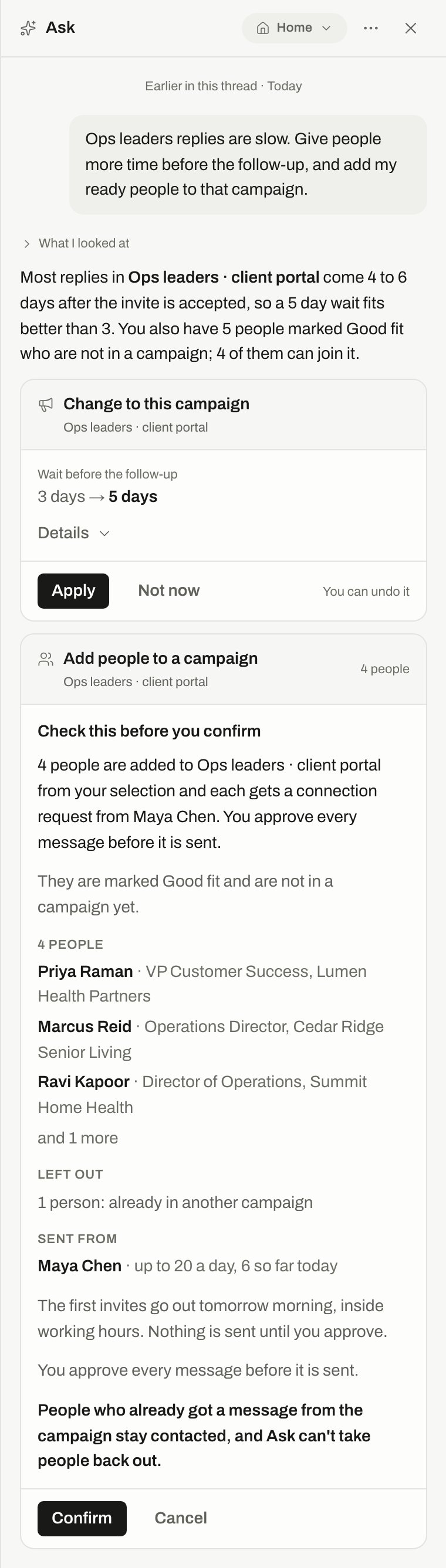
A safe card with Apply, and a risky card after the first press of Confirm.
You also tick “I understand and want to go ahead” when more than 50 people are affected. For automatic approval, the tick reads “I understand messages will go out without my review”.
A confirmation lasts 15 minutes and works once. If the facts change while you look, Ask shows the new numbers instead of acting on the old ones.
What Ask won’t do
Ask gives you an “Open here” link for these instead:- billing and plans,
- inviting teammates and changing roles,
- API keys,
- connecting or disconnecting LinkedIn or email,
- deleting a workspace.
Who can do what
- Applying a card: only the person who asked can apply, confirm or dismiss it.
- Undoing a change: the person who asked, or an owner or admin. Notification settings can only be undone by the person who asked.
- Owners and admins only: Radar changes and loosening safety settings.
See what Ask changed
Open the menu in Ask and press What Ask changed. It lists changes across the workspace, with a filter for Everyone or Me. Details about people are visible only to the person who asked. Your threads are private to you. Other people’s suggestions that nobody applied stay private too. Start a new thread here starts fresh on the page you’re on. Messages older than 180 days are deleted.Limits
When you reach a limit, Ask tells you when it opens again.
On Free, Ask answers questions but offers no change cards. Undo still works for earlier changes. See Plans.
Troubleshooting
This suggestion expired
This suggestion expired
Cards last 7 days. Ask again for a fresh one.
That didn't go through
That didn't go through
Nothing changed. Ask again for a fresh card.
It may have been sent
It may have been sent
If sending a reply gives this message, check the conversation in Inbox before trying again, so the person doesn’t get it twice.
Ask can only answer questions on the Free plan
Ask can only answer questions on the Free plan
Upgrade to let Ask make changes. See Plans.
Related
Home
Work through your day.
Reports
See the numbers Ask reads.
Safety pauses
What safety settings do.
Workspace and team
Who’s an owner, admin or member.